Google Drive Data Extraction Using Kali Linux
Google Drive is a popular cloud storage service used by millions of people worldwide. While it offers robust security features, like any online service, it can be vulnerable to exploitation if not properly secured. In cybersecurity, understanding how to extract data from Google Drive is a crucial skill, particularly for penetration testers and security researchers.
Context / Why This Matters
Cybersecurity is a critical field, and understanding how to extract data from cloud services like Google Drive can help in identifying vulnerabilities and protecting sensitive information. This knowledge is essential for both defenders and ethical hackers. By learning the techniques used in data extraction, security experts can better defend against potential threats and ensure the safety of digital assets.
Main Discussion
Understanding the Tools
Google Drive data extraction typically involves several tools and techniques. Kali Linux, a specialized Linux distribution for digital forensics and penetration testing, is often used for this purpose. Key tools mentioned in the context include:
- Google ReCaptcha: This is a security measure designed to protect websites from bots. However, in the context of data extraction, it may be bypassed using specific scripts.
- Ngrok: This tool creates secure tunnels to localhost, allowing you to expose a web server running on a local machine to the internet. It's useful for bypassing network restrictions and accessing local servers remotely.
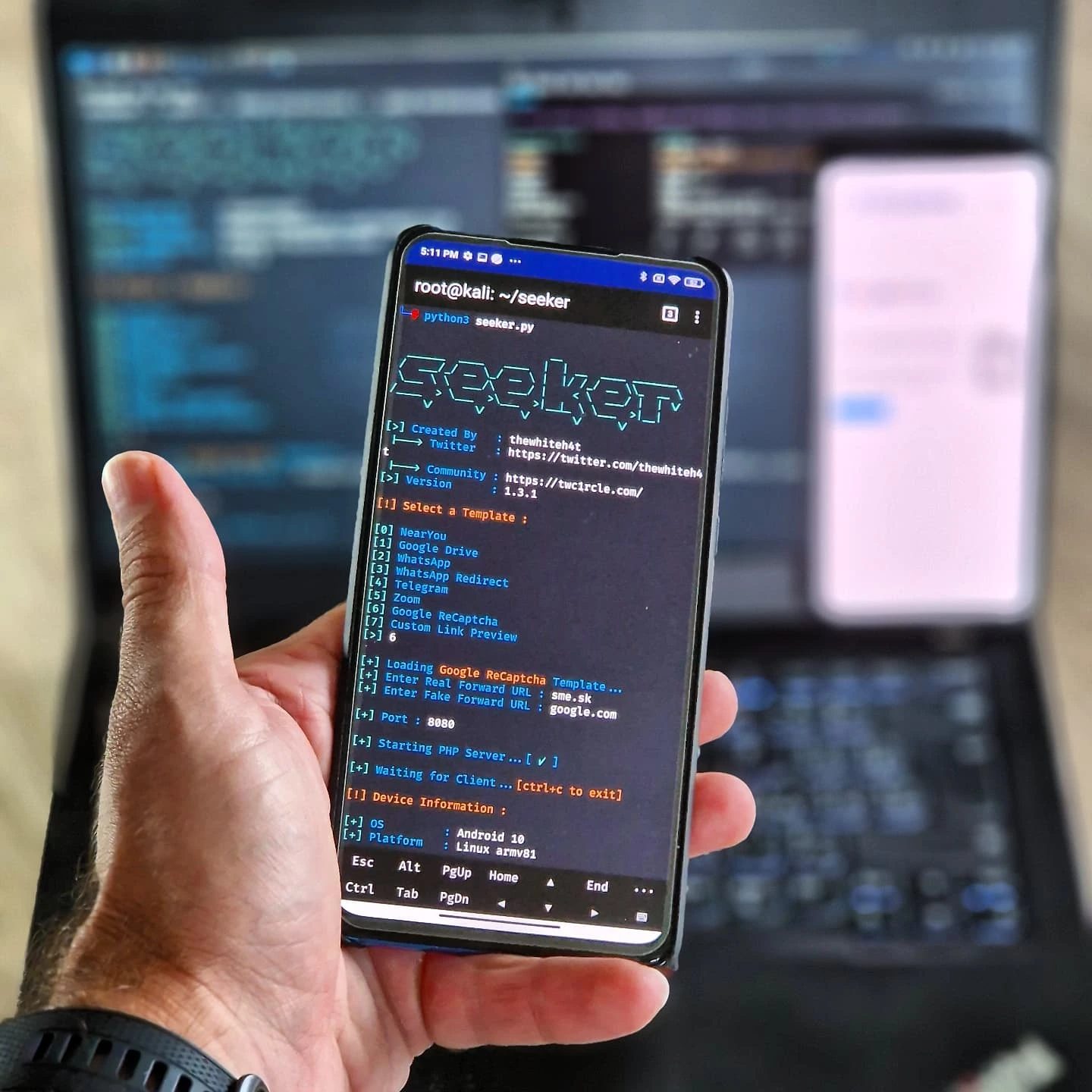
- Python Scripts: Custom scripts, such as 'seeker.py', are used to automate the process of data extraction, making it more efficient and less error-prone.
Step-by-Step Data Extraction
The process of extracting data from Google Drive involves several steps. Here’s a general overview:
- Bypassing Authentication: One of the first steps in data extraction is bypassing any authentication mechanisms. Google ReCaptcha is a common hurdle, but it can be circumvented using specialized scripts.
- Loading a Template: The script loads a pre-defined template, which is essential for structuring the data extraction process. This template specifies the type of data to extract and the format in which it should be presented.
- Forwarding URLs: Once the template is loaded, the script forwards URLs to the target server. This step is crucial for establishing a connection and initiating the data extraction process.
- Starting a PHP Server: A PHP server is started to handle the data extraction requests. This server processes the requests and extracts the data from Google Drive.
- Extracting Data: Finally, the script extracts the data and can be configured to save it in a specified format, such as a CSV file or a database.
Important Tools
- Kali Linux: This specialized Linux distribution comes pre-installed with a variety of tools for penetration testing and digital forensics. It is widely used in the cybersecurity community for its robust set of features and ease of use.
- Ngrok: As mentioned earlier, Ngrok is a powerful tool for creating secure tunnels to localhost. It is particularly useful in scenarios where you need to access a local server from the internet.
Practical Tips
Securing Your Google Drive
- Enable Two-Factor Authentication: This adds an extra layer of security to your Google Drive account, making it harder for unauthorized users to gain access.
- Use Strong Passwords: Ensure that your Google Drive password is strong and unique. Avoid using easily guessable passwords.
- Monitor Activity: Regularly check the activity log on your Google Drive to identify any suspicious activity.
- Limit Access: Be cautious about who you share your files with. Limit access to only those who need it and revoke access when it is no longer required.
Enhancing Your Cybersecurity Skills
- Learn Python: Python is a powerful programming language that is widely used in cybersecurity. Learning Python can help you write custom scripts for data extraction and automation.
- Explore Kali Linux: Familiarize yourself with Kali Linux and the various tools it offers. This can significantly enhance your skills in penetration testing and digital forensics.
- Practice Ethical Hacking: Engage in ethical hacking exercises to gain hands-on experience in data extraction and other cybersecurity techniques.
Important Takeaways
- Data Extraction is a Complex Process: It involves multiple steps and tools, each with its own role in the process.
- Security Measures are Crucial: Always ensure that your data is well-protected, especially on cloud services.
- Ethical Hacking is Essential: Understanding how to extract data can help in identifying vulnerabilities and protecting sensitive information.
Conclusion
Google Drive data extraction is a critical skill in the field of cybersecurity. By understanding the tools and techniques involved, security professionals can better protect digital assets and identify potential vulnerabilities. Whether you are a penetration tester, a security researcher, or someone interested in enhancing your cybersecurity skills, mastering data extraction techniques is a valuable pursuit.
Watch the Reel
Questions readers ask
What is Ngrok and how is it used in extracting data from Google Drive with Kali Linux?
Ngrok is a tool that creates secure tunnels to localhost, allowing you to expose a local server to the internet. In the context of extracting data from Google Drive, Ngrok can be used to facilitate communication between your Kali Linux machine and Google Drive's servers, enabling data retrieval from a remote or local web server.
Can I retrieve data from Google Drive using a terminal in Kali Linux?
Yes, you can retrieve data from Google Drive using a terminal in Kali Linux. This typically involves using Python scripts and tools like Ngrok to access and download files from your Google Drive account. The process requires some familiarity with command-line interfaces and scripting.
What are the key steps in a Google Drive data extraction tutorial using Kali Linux?
A typical Google Drive data extraction tutorial using Kali Linux involves setting up Ngrok to create a tunnel, writing or using a Python script to interact with Google Drive's API, and running the script in the terminal to retrieve the desired data. The tutorial will also cover authentication steps to access your Google Drive account securely.
How does using Python scripts aid in extracting data from Google Drive on Kali Linux?
Python scripts can automate the process of accessing and downloading files from Google Drive. By using Google Drive's API, these scripts can interact with your Google Drive account, list files, and download them directly to your Kali Linux machine. This method is efficient and can handle large volumes of data.
What precautions should be taken when extracting data from Google Drive for security research purposes?
When extracting data from Google Drive for security research purposes, it's crucial to ensure that you have proper authorization to access the data. Use secure methods to handle credentials, such as OAuth, and always follow ethical guidelines to protect the privacy and security of the data. Unauthorized data extraction can be illegal and unethical.
Recent articles
Fresh deep dives from the latest Reels we unpacked.




Comments
Be the first to comment.