Robotic Control with Augmented Reality
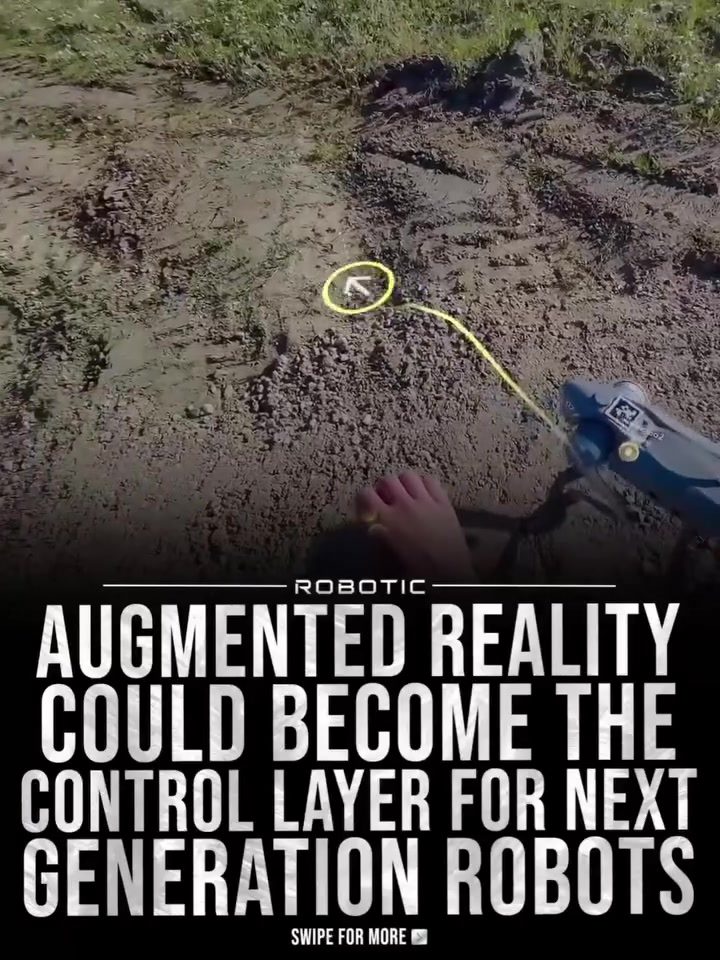
Augmented reality (AR) is transforming how we control and interact with robots, offering a glimpse into a future where robotic interfaces are more intuitive and immersive. This shift is exemplified by the integration of AR with the Unitree Go2 Lite robot, enhancing control and monitoring through real-world overlays.
Context / Why this matters
As robots become more integrated into our daily lives, the methods used to control and monitor them must evolve. Traditional dashboards and screens can be limiting, often requiring a high level of training to operate effectively. By overlaying live data directly onto the physical world, AR can make robotic control more accessible and intuitive.
Main discussion
The Role of AR in Robotic Control
Augmented reality enhances robotic control by providing a more natural and intuitive interface. Instead of relying on traditional screens, users can interact with robots directly within their environment. This is achieved through AR headsets, which overlay digital information onto the physical world. For instance, the Meta Quest headset is used to display real-time data from the Unitree Go2 Lite, such as LiDAR point clouds, navigation paths, sensor readings, and system alerts, all in 3D.
Key Components of AR-Enhanced Robotic Control
-
Meta Quest Headset: This AR device allows users to see live data from the robot in their field of view. It serves as the interface between the user and the robot, providing a seamless experience.
-
Unitree Go2 Lite: This agile robot can navigate various terrains, making it an excellent testbed for AR-controlled robotics. The Unitree Go2 Lite is equipped with sensors and LiDAR, which provide the necessary data for AR overlays.
-
Dimensionals’ Robotics Platform: This platform integrates with the Unitree Go2 Lite and the Meta Quest headset, enabling real-time data visualization. It acts as the intermediary, processing data from the robot and rendering it in the AR environment.
The Benefits of AR in Robotic Control
Enhanced Monitoring
Monitoring robots in real-time is crucial for ensuring their safe and effective operation. AR overlays make this process faster and clearer. Instead of toggling between different screens, users can see all relevant data in their immediate field of view. This allows for quicker decision-making and better situational awareness.
Intuitive Control
Controlling robots through traditional interfaces can be complex and require extensive training. AR simplifies this process by making the control mechanism more intuitive. By interacting directly with the robot in the physical world, users can more easily understand and manipulate its movements and functions.
Efficient Debugging
Debugging robotic systems is often a time-consuming process. AR overlays can make this task easier by providing clear, real-time visualizations of the robot’s internal workings. This helps developers quickly identify and rectify issues, leading to more efficient development cycles.
Practical tips
Setting Up AR for Robotic Control
-
Choose the Right Headset: Select an AR headset that is compatible with your robotics platform. The Meta Quest headset is a popular choice due to its high resolution and ease of use.
-
Integrate with Your Robot: Ensure that your robot is equipped with the necessary sensors and data outputs. The Unitree Go2 Lite, for example, has built-in LiDAR and sensors that provide the data needed for AR overlays.
-
Use a Reliable Platform: Employ a robust robotics platform like Dimensionals’ to process and render data in the AR environment. This ensures that the data is accurate and up-to-date.
Getting Started with AR-Enhanced Robotic Control
-
Install Necessary Software: Download and install the software required for the AR headset and robotics platform. Follow the manufacturer’s instructions to ensure a smooth setup.
-
Calibrate Your System: Calibrate the AR headset and robot to ensure that the data overlays are accurate. This may involve adjusting settings in both the headset and the robotics platform.
-
Practice and Experiment: Spend time practicing with the AR interface to get used to its capabilities. Experiment with different settings and overlays to find what works best for your specific application.
Important takeaways
- AR enhances robotic control by providing a more intuitive and immersive interface for users.
- Real-time data visualization makes monitoring and debugging more efficient and effective.
- Combination of AR headsets, robots, and robotics platforms allows for seamless integration and control.
- Practical steps for setting up and using AR for robotic control can help users get started quickly and effectively.
Conclusion
Augmented reality is poised to revolutionize the way we control and interact with robots. By overlaying live data directly onto the physical world, AR makes robotic control more intuitive and efficient. The integration of AR with the Unitree Go2 Lite robot demonstrates the potential of this technology, providing a glimpse into a future where robotic interfaces are more seamless and immersive. As developers continue to explore and refine these capabilities, the future of robotic control looks brighter than ever.
Watch the Reel
Questions readers ask
How does AR technology enhance the control of robots like the Unitree Go2?
AR technology enhances robotic control by overlaying real-time data and controls directly onto the user's view of the physical world, reducing the need for traditional screens and complex interfaces. This makes the control process more intuitive and accessible, as users can see and interact with the robot directly in their environment.
What are the benefits of using AR for controlling the Unitree Go2 robot?
Using AR for controlling the Unitree Go2 robot provides several benefits. It simplifies the control process by eliminating the need for complex training, offers immersive and intuitive interaction, and enhances real-time decision-making by overlaying crucial data directly onto the user's field of view.
Can AR technology make robotic control more accessible to beginners?
Yes, AR technology can make robotic control more accessible to beginners by providing an intuitive interface. Instead of navigating complex dashboards, users can see and interact with the robot directly, making the learning process more straightforward and engaging.
How does AR improve the monitoring of robotic systems like the Unitree Go2?
AR improves robotic monitoring by overlaying live data and diagnostics directly onto the user's view of the robot. This real-time information allows users to quickly assess the robot's status, identify potential issues, and make informed decisions without needing to switch between multiple screens or interfaces.
What kinds of overlays can be expected when using AR with the Unitree Go2?
When using AR with the Unitree Go2, users can expect to see a variety of overlays, including real-time data feeds, navigation paths, sensor readings, and control icons. These overlays provide immediate feedback and allow for precise adjustments, enhancing both control and navigation.
Is AR technology compatible with all types of robots, or is it specific to certain models like the Unitree Go2?
AR technology is compatible with a wide range of robots, not just specific models like the Unitree Go2. However, the integration and functionality can vary depending on the robot's capabilities and the specific AR software used. The Unitree Go2 serves as a notable example of how AR can be effectively implemented in robotic control.
What is the future of robotic control with AR technology?
The future of robotic control with AR technology is poised to make interactions even more seamless and intuitive. As AR advancements continue, we can expect to see more sophisticated overlays, enhanced real-time data integration, and potentially even gesture-based control, further simplifying the way we operate and monitor robots.
Related deep dives
Similar reads based on topic and creator.



Recent articles
Fresh deep dives from the latest Reels we unpacked.




Comments
Be the first to comment.