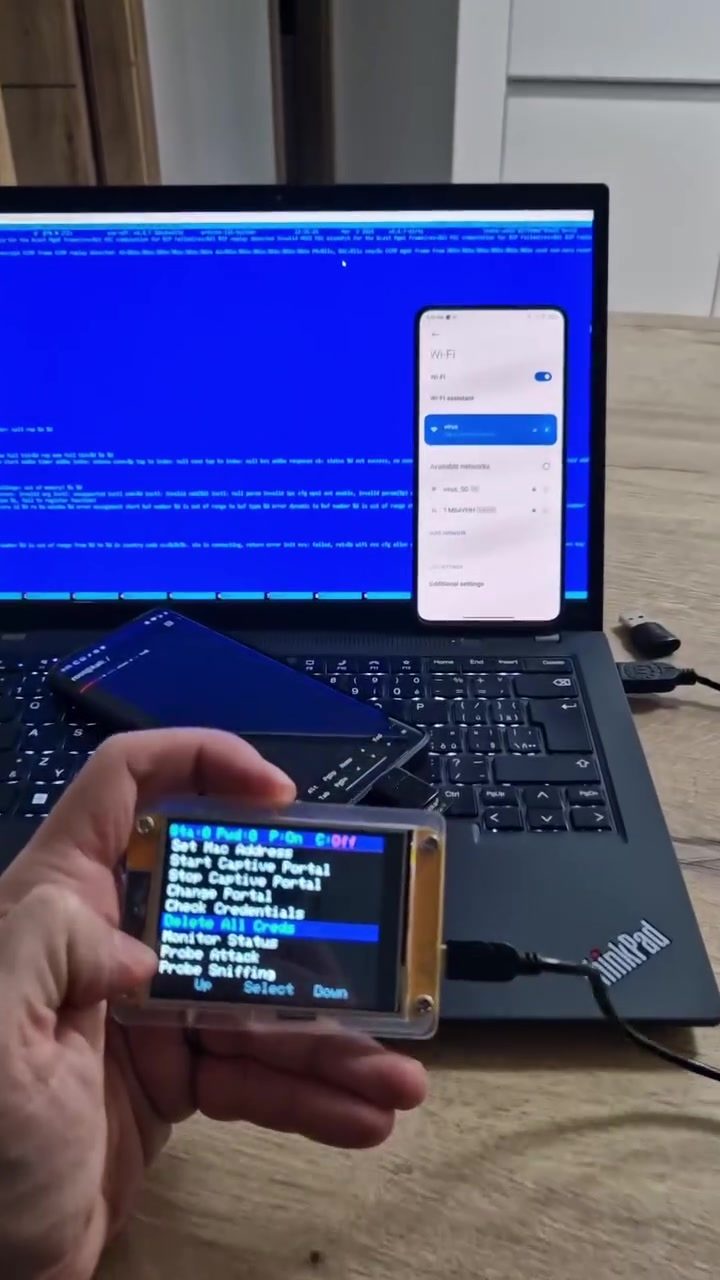
WiFi Hacking Devices: Understanding the EQUIP Hacking Tool
WiFi hacking devices, like the EQUIP tool, are powerful tools designed to test and exploit vulnerabilities in wireless networks. These devices are often used by cybersecurity professionals to assess network security, identify weaknesses, and improve overall defense mechanisms. The EQUIP device, in particular, offers a range of functionalities that make it a versatile tool for both penetration testing and network monitoring.
Context / Why This Matters
In today's interconnected world, the security of WiFi networks is paramount. With the increasing number of devices connected to WiFi, the potential for breaches and unauthorized access has also risen. WiFi hacking devices play a crucial role in identifying and mitigating these risks. By simulating attacks and probing networks for weaknesses, these tools help organizations strengthen their security measures and protect sensitive data.
Main Discussion
Understanding the EQUIP Device
The EQUIP WiFi hacking device is a portable tool designed to perform various tasks related to network security. Its small size and lightweight design make it easy to carry and use in different environments. The device connects to a laptop, providing a range of options on its screen, including 'Change Portal,' 'Check Credentials,' and 'Probe Attack.'
Key Features
- Portability: The EQUIP device is compact and light, making it convenient for field use.
- Credential Checking: The tool can check and store credentials, which is essential for understanding how easily passwords can be compromised.
- Network Monitoring: It offers real-time monitoring of network status, allowing users to see when and how devices connect to the network.
Probing and Attacking
One of the standout features of the EQUIP device is its ability to perform various types of attacks, including 'Probe Attack' and 'Karma Attack.' These attacks are designed to simulate real-world threats and help users understand the vulnerabilities in their network.
Probe Attack This type of attack involves scanning the network for connected devices and gathering information about them. This can include MAC addresses, device types, and other identifying information. By understanding what devices are on the network, users can better secure their environment and identify potential points of entry for attackers.
Karma Attack This attack focuses on tricking devices into connecting to a rogue access point, allowing the attacker to intercept data. There are different modes of operation within the Karma Attack, including 'Karma Auto' and 'Karma Spear.' Auto mode automatically creates a fake network and tries to lure devices to connect, while Spear mode targets specific devices, making it more precise and potentially more effective.
Monitor and Control
The EQUIP device also offers robust monitoring and control options. Features like 'Monitor Status' and 'Delete All Creds' provide users with the tools they need to manage and secure their network effectively.
- Monitor Status: This feature allows users to monitor the status of their network in real-time, including the number of connected devices and any suspicious activity.
- Delete All Creds: This option lets users clear all stored credentials, which can be useful for resetting the device or ensuring that sensitive information is not left behind.
Practical Tips
Choosing the Right WiFi Hacking Device
When selecting a WiFi hacking device, consider the following factors:
- Portability: Look for a device that is easy to carry and use in different environments.
- Features: Ensure the device offers the functionalities you need, such as credential checking, network monitoring, and attack simulation.
- User Interface: A clear and intuitive interface can make a big difference in how effectively you can use the device.
- Support and Updates: Choose a device from a reputable brand that offers regular updates and support.
Best Practices for Using a WiFi Hacking Device
To get the most out of your WiFi hacking device, follow these best practices:
- Regularly Update: Ensure that your device's firmware and software are up-to-date to benefit from the latest features and security patches.
- Test in Controlled Environments: Always start by testing the device in a controlled environment to understand its capabilities and limitations.
- Document Findings: Keep detailed records of your findings and actions to track improvements and identify areas that need further attention.
- Follow Legal Guidelines: Always use the device in compliance with local laws and regulations. Unauthorized access to networks is illegal and unethical.
Important Takeaways
Understanding and utilizing WiFi hacking devices like the EQUIP tool is essential for maintaining robust network security. These devices provide a comprehensive set of tools for probing, attacking, and monitoring networks, helping users identify and mitigate vulnerabilities. By using these tools responsibly and following best practices, organizations can significantly enhance their network security and protect sensitive data.
Conclusion
WiFi hacking devices are invaluable tools for cybersecurity professionals and anyone interested in securing their network. The EQUIP device, with its range of functionalities and user-friendly interface, stands out as a powerful option for anyone looking to test and improve their network security. By understanding the features and capabilities of these devices, users can better protect their networks and stay ahead of potential threats.
Watch the Reel
Questions readers ask
What is the primary purpose of the EQUIP WiFi Hacking Device?
The EQUIP WiFi Hacking Device is designed to test and enhance the security of wireless networks. It helps cybersecurity professionals identify potential vulnerabilities by conducting various security assessments and simulations.
What are some of the key features of the EQUIP WiFi Hacking Device?
The EQUIP device offers several key features, including credential checking, network monitoring, and multiple attack simulations. These features allow users to simulate real-world threats and evaluate the effectiveness of their network's defenses.
How portable is the EQUIP WiFi Hacking Device?
The EQUIP WiFi Hacking Device is highly portable, making it ideal for on-the-go security assessments. Its lightweight design allows professionals to easily carry it to different locations for comprehensive network security testing.
What type of users is the EQUIP WiFi Hacking Device suited for?
The EQUIP device is primarily suited for cybersecurity professionals who need to conduct thorough WiFi security testing. It is also useful for individuals looking to enhance their network's security by identifying and mitigating vulnerabilities.
Can the EQUIP WiFi Hacking Device be used for monitoring network activity?
Yes, the EQUIP device includes network monitoring capabilities. This feature allows users to keep a close eye on network activity, detect unusual patterns, and respond to potential security threats in real-time.
What kind of attack simulations does the EQUIP WiFi Hacking Device support?
The EQUIP device supports a variety of attack simulations, such as deauthentication attacks, denial-of-service (DoS) attacks, and WPA/WPA2 cracking. These simulations help users understand how their network might be compromised and improve their defense strategies.
Is the EQUIP WiFi Hacking Device affordable for small businesses?
The EQUIP device is designed to be an affordable WiFi hacking tool, making it accessible to small businesses. It provides excellent functionality at a competitive price, ensuring that even smaller organizations can perform comprehensive WiFi security testing.
Recent articles
Fresh deep dives from the latest Reels we unpacked.




Comments
Be the first to comment.