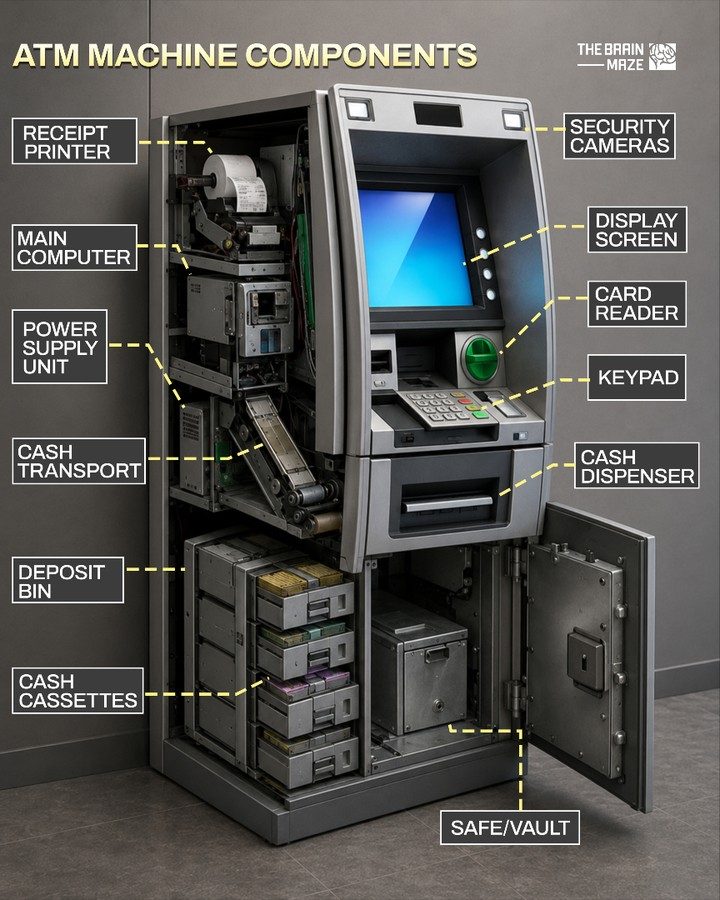
ATM Machine Components
Automated Teller Machines (ATMs) have become ubiquitous in modern banking, providing convenient access to cash and other financial services. Understanding the internal components of an ATM and how they work together is essential for appreciating the complexity and reliability of these machines. Let's delve into the key parts of an ATM and their roles in processing transactions.
Context / Why This Matters
ATMs have revolutionized the way people access their money and perform basic banking transactions. They provide a secure and efficient means of withdrawing cash, checking account balances, and even depositing funds. The internal components of an ATM are designed to work seamlessly together, ensuring that these transactions are processed accurately and securely. By understanding these components and their functions, we can better appreciate the engineering and technology that go into making these machines reliable and user-friendly.
Main Discussion
Display Screen and Keypad
The display screen and keypad are the primary interfaces through which users interact with the ATM. The display screen provides clear, step-by-step instructions and feedback during the transaction process. It guides users through selecting the type of transaction, entering their PIN, and confirming the details. The keypad, on the other hand, allows users to input their PIN, select options, and confirm transactions.
Card Reader and Security Cameras
The card reader is a crucial component that processes payment card information. It reads the magnetic strip or chip on the card to verify the user's identity and access their account details. Security cameras are integrated into the ATM to provide surveillance and enhance safety. These cameras monitor the ATM's surroundings, deterring potential fraud and ensuring the security of both the machine and its users.
Cash Dispenser and Deposit Bin
The cash dispenser is responsible for distributing money to users. It retrieves cash from the cash cassettes and dispenses it through the dispensing slot. The deposit bin, on the other hand, accepts cash deposits. When a user wants to deposit cash, they insert the money into the deposit bin, which then counts and stores it securely within the machine.
Cash Cassettes, Safe/Vault, and Cash Transport System
Cash cassettes are storage units that hold the dispensed currency. These cassettes are typically secured within a safe or vault, which provides an additional layer of protection. The cash transport system is responsible for moving money between the cash cassettes and the cash dispenser. It ensures that the correct amount of cash is delivered to the user during a withdrawal transaction.
Main Computer and Power Supply Unit
The main computer, often referred to as the controller, is the brain of the ATM. It controls all the operations of the machine, from processing transactions to managing the overall system. The power supply unit provides the necessary electricity to run all the components of the ATM, ensuring uninterrupted operation. It is designed to handle the power requirements of the various components, including the display screen, keypad, and cash transport system.
Communication Module and Secure Vault
The communication module facilitates the exchange of data between the ATM and the bank's central system. It ensures that transaction data is securely transmitted and received, enabling real-time updates on account balances and transaction history. The secure vault, which houses the cash cassettes and other critical components, provides a robust physical barrier to prevent unauthorized access and safeguard the ATM's contents.
Receipt Printer
The receipt printer is another essential component that provides users with a record of their transactions. After completing a transaction, the printer generates a receipt detailing the type of transaction, the amount, and the date and time. This receipt serves as a physical record that users can keep for their records, ensuring transparency and accountability.
Practical Tips
Ensuring ATM Security
To enhance the security of ATMs, users can follow several practical tips:
- Cover the Keypad: When entering your PIN, use your hand or body to cover the keypad. This helps prevent shoulder-surfing and protects your PIN from being seen by others.
- Check for Tampering: Before using an ATM, inspect the machine for any signs of tampering or unusual modifications. If you notice anything suspicious, do not use the machine and report it to the bank.
- Use Well-Lit and Busy Locations: Whenever possible, use ATMs located in well-lit and busy areas. This reduces the risk of being targeted by criminals.
- Monitor Your Account: Regularly check your account statements and transactions to ensure there are no unauthorized activities. Report any discrepancies to your bank immediately.
Maintaining ATM Functionality
For ATM operators and maintenance personnel, ensuring the smooth operation of the machine is crucial. Regular maintenance and inspections can help prevent malfunctions and downtime. Key aspects to focus on include:
- Cleaning and Lubrication: Regularly clean the keypad, display screen, and other user-interactive components. Lubricate moving parts to ensure smooth operation.
- Software Updates: Keep the ATM's software up to date to benefit from the latest security patches and performance improvements.
- Power Supply Checks: Ensure that the power supply unit is in good condition and that the ATM has a reliable power source. Regularly test the backup power supply to ensure it functions correctly in case of a power outage.
Enhancing User Experience
To provide a better user experience, ATM operators can consider the following:
- User-Friendly Interface: Design the ATM interface to be intuitive and easy to navigate. Clear instructions and user-friendly prompts can enhance the overall user experience.
- Accessibility Features: Incorporate accessibility features such as braille keypads, audio guidance, and adjustable height for wheelchair users to make the ATM more inclusive.
- Multilingual Support: Offer multilingual options to cater to a diverse user base, making the ATM more accessible to non-native speakers.
Important Takeaways
Understanding the internal components of an ATM and their functions provides valuable insights into the reliability and security of these machines. Key takeaways include:
- Interconnected Components: The various components of an ATM work together to ensure smooth and secure transactions. From the display screen and keypad to the cash dispenser and receipt printer, each part plays a critical role.
- Security Measures: ATMs are equipped with multiple security features, including security cameras, secure vaults, and data encryption, to protect users and their money.
- Maintenance and Updates: Regular maintenance and software updates are essential for keeping ATMs functional and secure. Operators should prioritize routine checks and updates to prevent malfunctions and security breaches.
- User Tips: Users can enhance their safety and security by following best practices, such as covering the keypad, inspecting the ATM for tampering, and monitoring their account transactions.
Conclusion
ATM machines are complex systems designed to provide efficient and secure banking services. By understanding the internal components and their functions, users and operators can better appreciate the technology and engineering that go into making these machines reliable and user-friendly. Whether you are a regular ATM user or an operator responsible for maintaining these machines, knowing how an ATM works can enhance your experience and ensure the smooth operation of these vital financial tools.
Watch the Reel
Questions readers ask
What is the role of the ATM's display screen and keypad in transaction processing?
The display screen is your primary interface with the ATM, guiding you through the transaction process by showing available options and prompts. The keypad, on the other hand, is how you input your PIN and transaction details, making these two components essential for secure and accurate transaction processing.
How does the ATM card reader function and why is it important?
The card reader is responsible for capturing information from the magnetic strip or chip on your card. It verifies your card details and ensures that the ATM can communicate securely with your bank. This step is crucial for authenticating your identity and initiating the transaction process.
What are ATM cassettes and how do they work?
ATM cassettes are secure, removable containers within the ATM that store cash. They are designed to hold specific denominations and are connected to the cash dispenser. When a withdrawal is requested, the ATM's software communicates with the cassettes to retrieve the correct amount of cash, ensuring efficient and accurate cash handling.
What security features are integrated into ATM components to protect users?
ATMs have multiple security features, including encrypted communication between the card reader and the bank, secure vaults to protect cash storage, and tamper-evident seals on the cassettes. Additionally, the ATM's software employs fraud detection mechanisms to prevent unauthorized transactions, enhancing overall user protection.
What is the purpose of the ATM's cash transport system?
The cash transport system is responsible for moving cash from the cassettes to the dispenser and back to the vault during deposits. It ensures that cash is handled securely and efficiently, minimizing the risk of theft or misplacement. This system is a critical part of the ATM's internal workings, contributing to its reliability and security.
How does the ATM's power supply system ensure continuous operation?
ATMs typically use a UPS (Uninterruptible Power Supply) system to ensure continuous operation even during power outages. This system provides backup power, allowing the ATM to complete transactions in progress and safely shut down if necessary. It is crucial for maintaining the ATM's availability and reliability.
What is the role of the ATM receipt printer in the transaction process?
The receipt printer provides a physical record of your transaction, listing details such as the amount withdrawn, your account balance, and the date and time of the transaction. This component is important for record-keeping and can be useful for reconciling your account or resolving any issues that may arise.
Related deep dives
Similar reads based on topic and creator.




Recent articles
Fresh deep dives from the latest Reels we unpacked.




Comments
Be the first to comment.