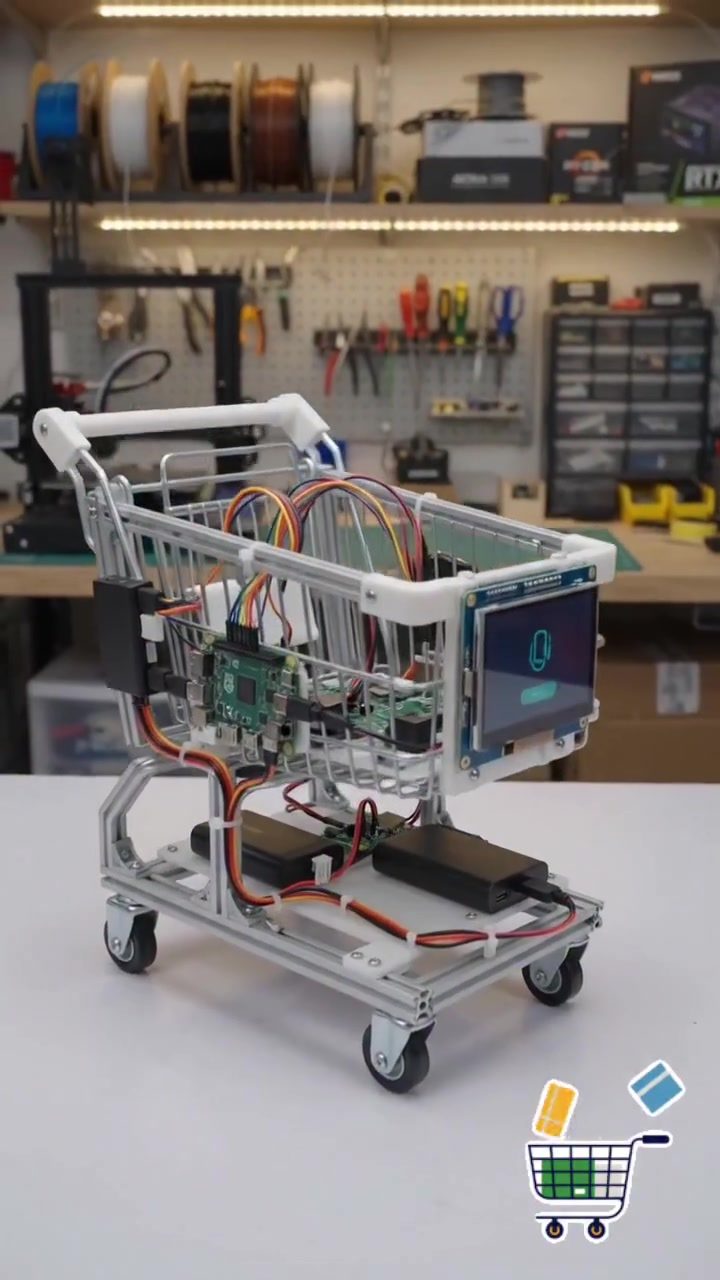
DIY Smart Shopping Cart
Creating a smart shopping cart is an exciting project for anyone interested in electronics, robotics, and DIY innovation. This project involves integrating various technologies to enhance the traditional shopping experience, making it more efficient and secure. This article will walk you through the essential components and functionalities of a smart shopping cart, providing practical tips and important takeaways to help you build your own.
Context / Why this matters
With the rise of technology in everyday life, the concept of a smart shopping cart is becoming increasingly relevant. Traditional shopping carts lack the convenience and security that modern consumers expect. Incorporating features like RFID login, indoor navigation, and AI tracking can significantly improve the shopping experience. Smart weight security adds an extra layer of theft prevention, and instant payment via QR code makes the checkout process seamless.
Main discussion
The Ultimate Shopping Cart
Building the ultimate shopping cart involves several key components and technologies. The first step is to log in with an RFID card. This ensures that the cart is personalized to the user, allowing for a more tailored shopping experience. Indoor navigation helps users find their way around the store more efficiently, while AI tracking keeps a real-time inventory of the items in the cart.
RFID Login
RFID (Radio Frequency Identification) technology allows for quick and secure login to the smart shopping cart. This technology uses radio waves to read and capture information stored on an RFID tag. By logging in with an RFID card, users can access their personalized shopping preferences, loyalty points, and other relevant information.
Indoor Navigation
Indoor navigation is essential for a smooth shopping experience. Technology like Bluetooth Low Energy (BLE) beacons and Ultra-Wideband (UWB) can help guide shoppers through the store. These systems use a network of sensors and beacons to provide real-time location data, enabling the cart to navigate through the aisles efficiently.
AI Tracking
AI tracking is a crucial feature that enhances the shopping experience. By using AI, the smart cart can keep a real-time inventory of the items placed in it. This technology helps in tracking the quantity and price of each item, providing an accurate total at the checkout. AI can also help in suggesting items based on the user's preferences and past purchases.
Smart Weight Security
Smart weight security is a vital feature to prevent theft. The cart is equipped with sensors that monitor the weight of the items. If an item is removed without being scanned, the system will detect the weight discrepancy and alert the store personnel. This feature adds an extra layer of security, ensuring that all items are accounted for at the checkout.
Instant Payment via QR Code
One of the most convenient features of a smart shopping cart is the ability to pay instantly via QR code. This eliminates the need for traditional checkout lines. The cart's screen displays a QR code that the user can scan to complete the payment. This feature not only saves time but also enhances the overall shopping experience by making it more efficient and hassle-free.
Smart Shopping Cart Demo
A smart shopping cart prototype demonstrates how these technologies work together to create a seamless shopping experience. The cart's screen displays a running total of the items, allowing users to keep track of their spending in real-time. This feature is particularly useful for budget-conscious shoppers who want to stay within their spending limits.
Smart Shopping Cart Interface
The user interface of a smart shopping cart is designed to be intuitive and easy to use. The screen displays important information such as the itemized list, total price, and payment options. This interface ensures that users can easily navigate through the shopping process without any confusion.
Smart Shopping Cart Checkout
The checkout process with a smart shopping cart is streamlined and efficient. The cart's screen displays 'Run to Pay,' and when the user is ready to complete the transaction, they can tap the 'Payment Successful' button. This process eliminates the need for traditional checkout lines, making the shopping experience faster and more convenient.
Practical tips
Choosing the Right Components
To build a smart shopping cart, you'll need a variety of electronic components and tools. Here are some essential components to consider:
- Raspberry Pi: A versatile microcomputer that can be used as the brain of the smart cart. It can handle various tasks such as running the user interface, processing data from sensors, and managing the communication between different components.
- RFID Reader: This device reads the RFID tag attached to the user's card, allowing for quick and secure login.
- Weight Sensors: These sensors monitor the weight of the items in the cart, helping to prevent theft.
- Display Screen: A touchscreen display allows users to interact with the cart, view their shopping list, and complete payments.
- 3D Printer: Useful for prototyping and creating custom parts for the cart.
Assembly and Programming
Once you have all the components, the next step is assembly and programming. Here are some tips to help you through the process:
- Assembly: Start by mounting the electronic components on the cart. Ensure that the Raspberry Pi, RFID reader, and weight sensors are securely attached and connected.
- Programming: Write the necessary code to integrate all the components. This includes setting up the RFID login, indoor navigation, AI tracking, and the payment system.
- Testing: Test each component individually to ensure that they are working correctly. Once everything is functioning, conduct a full test run to check the overall performance of the smart cart.
Important takeaways
Building a smart shopping cart is a complex but rewarding project. It involves integrating various technologies to create a more efficient and secure shopping experience. By incorporating features like RFID login, indoor navigation, AI tracking, smart weight security, and instant payment via QR code, you can build the ultimate smart shopping cart. The key takeaways are:
- Personalization: RFID login allows for a personalized shopping experience.
- Efficiency: Indoor navigation and AI tracking enhance the shopping process.
- Security: Smart weight security prevents theft and ensures all items are accounted for.
- Convenience: Instant payment via QR code saves time and eliminates traditional checkout lines.
Conclusion
Creating a smart shopping cart is a fantastic way to bring cutting-edge technology to everyday life. By following the steps and tips outlined in this article, you can build a smart shopping cart that enhances the shopping experience. Whether you're a DIY enthusiast, a tech hobbyist, or a professional in the field, this project offers a unique opportunity to explore the world of electronics, robotics, and coding. Embrace the challenge and start building your ultimate shopping cart today!
Watch the Reel
Related deep dives
Similar reads based on topic and creator.

Recent articles
Fresh deep dives from the latest Reels we unpacked.




Comments
Be the first to comment.