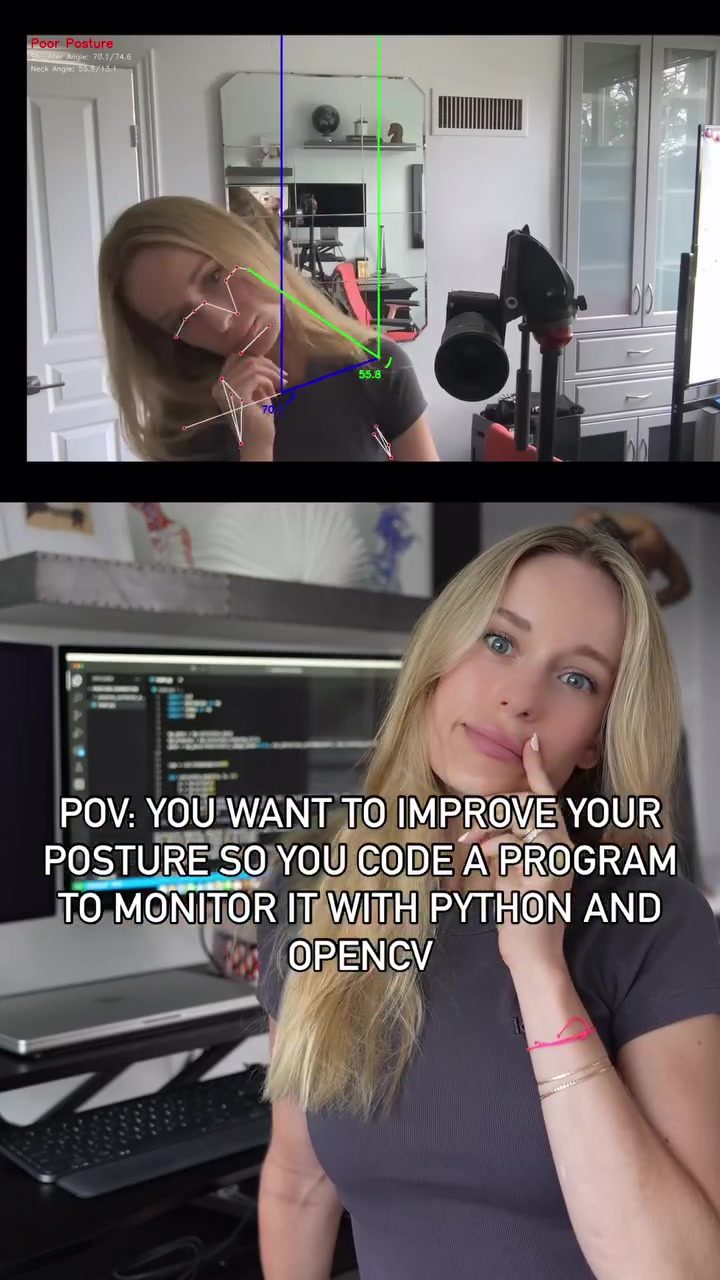
Posture Correction with Python and OpenCV
For those who spend long hours in front of a computer, maintaining good posture can be challenging. Fortunately, technology offers innovative solutions. One such solution involves using Python and OpenCV to create a program that monitors and corrects posture in real-time. This approach leverages the power of these programming tools to detect and track key body landmarks, assess posture, and provide alerts when poor posture is detected.
Why This Matters
Poor posture can lead to a host of issues, including back pain, neck strain, and reduced productivity. By continuously monitoring and correcting posture, individuals can mitigate these risks and enhance their overall well-being. This is particularly relevant for professionals who work on computers for extended periods, as the sedentary nature of their job can exacerbate posture-related problems.
Main Discussion
Understanding the Technology
OpenCV, or Open Source Computer Vision Library, is a powerful tool for computer vision tasks. When combined with Python, it enables the creation of applications that can analyze and interpret visual data. In the context of posture correction, OpenCV is used to detect and track key body landmarks, such as the shoulders and ears, in real-time. This data is then processed to calculate angles that assess the user's posture.
Setting Up the Program
The process begins with setting up the environment for Python and OpenCV. This involves installing the necessary libraries and ensuring that the computer has a functional camera to capture the user's posture. The program continuously detects and tracks key body landmarks, such as the shoulders and ears, in real-time. By analyzing these landmarks, the system can calculate angles that indicate the user's posture. For example, angles of 88.7 and 74.6 for the shoulders, and 24.5 and 13.1 for the neck, provide a clear indication of good posture.
Assessing and Correcting Posture
Once the angles are calculated, the system assesses the user's posture. If poor posture is detected, the program provides alerts to notify the user. These alerts can take various forms, such as visual cues or auditory signals, depending on the user's preferences. The goal is to prompt the user to correct their posture and maintain a healthier position.
Practical Implementation
The implementation of such a system involves several key steps. First, the user must set up the environment by installing Python and OpenCV. This typically involves downloading the necessary packages and ensuring compatibility with the operating system. Once the environment is set up, the user can begin coding the program. This involves writing scripts that define the key body landmarks and the calculations for assessing posture. The program then uses these scripts to continuously monitor the user's posture and provide alerts when necessary.
Sharing the Knowledge
Creating a program to monitor posture with Python and OpenCV is not only a practical solution but also an enjoyable learning experience. The process of coding the program involves understanding the intricacies of computer vision and applying them to a real-world problem. This knowledge is valuable for developers and tech enthusiasts alike.
Practical Tips
Getting Started with Python and OpenCV
If you're new to Python and OpenCV, getting started can seem daunting. However, there are numerous resources available to help you on your journey. Online tutorials, forums, and coding communities can provide valuable guidance and support. Additionally, many educational platforms offer structured courses that cover the basics and advance through more complex topics. These lessons can be incredibly helpful in building a foundational understanding and confidence in using these tools.
Choosing the Right Tools
Selecting the right tools is crucial for a successful project. When it comes to posture correction, Python and OpenCV are excellent choices due to their versatility and robustness. Python's simplicity and readability make it an ideal language for beginners and experts alike, while OpenCV's comprehensive suite of computer vision functions ensures that you have the tools you need to tackle complex tasks.
Continuous Learning and Improvement
Technology evolves rapidly, and staying current with the latest developments is essential for success. Continuously learning and improving your skills is crucial for long-term growth. This may involve exploring new libraries, experimenting with different algorithms, and staying updated with the latest advancements in the field. Engaging with the community through forums and coding challenges can also provide valuable insights and motivation to keep learning.
Integrating Posture Correction into Daily Life
To maximize the benefits of a posture correction program, it's important to integrate it into your daily routine. For instance, if you spend a lot of time working on a computer, set reminders to take breaks and check your posture periodically. Additionally, using the program during long hours of work can help you maintain good posture and reduce the risk of posture-related issues.
Important Takeaways
Leveraging Technology for Health
Posture correction programs demonstrate the potential of technology to improve health and well-being. By leveraging Python and OpenCV, individuals can create tools that monitor and correct their posture, reducing the risk of musculoskeletal issues and enhancing overall comfort. This approach showcases the practical applications of computer vision and programming in everyday life.
The Power of Community and Collaboration
Building a posture correction program is not only about coding and technology; it’s also about community and collaboration. Sharing knowledge and resources with others can accelerate learning and innovation. Engaging with online communities, attending coding meetups, and participating in hackathons can provide valuable opportunities to learn, collaborate, and grow.
Emphasizing Practical Application
While understanding the theoretical aspects of programming and computer vision is essential, applying this knowledge to solve real-world problems is equally important. Creating a posture correction program not only provides a practical solution to a common issue but also reinforces the importance of hands-on experience in learning.
Conclusion
Posture correction programs built with Python and OpenCV offer a practical and effective solution for improving posture and overall well-being. By continuously monitoring and correcting posture, individuals can mitigate the risks associated with poor posture, such as back pain and neck strain. This approach not only leverages the power of technology but also showcases the potential of coding and computer vision in addressing everyday challenges. Embracing this technology can lead to a healthier and more productive lifestyle, making it a valuable tool for anyone who spends extended periods in front of a computer.
Watch the Reel
Questions readers ask
What are the key benefits of using Python and OpenCV for posture correction?
Python and OpenCV provide a robust framework for developing a posture correction system. Python's simplicity and versatility make it ideal for coding, while OpenCV’s powerful computer vision capabilities enable real-time analysis of body movements and posture.
How does real-time posture monitoring help improve overall well-being?
Real-time posture monitoring helps by continuously tracking your posture and providing immediate feedback when you slouch or adopt a poor posture. This prevents prolonged periods of bad posture, which can lead to pain and discomfort, enhancing your overall well-being.
What body landmarks are typically monitored in a posture correction program?
Key body landmarks such as the shoulders, spine, and hips are commonly monitored. Your program should detect the position and orientation of these landmarks to assess your posture and determine if corrections are necessary.
When should I consider using a posture correction program?
If you spend long hours at a computer, have a sedentary lifestyle, or experience frequent back or neck pain, a posture correction program can be very beneficial. It helps to maintain good posture and reduce the risk of associated health issues.
How can a posture correction program help professionals who work long hours?
For professionals who work long hours, a posture correction program can significantly reduce the risk of posture-related issues. It provides continuous monitoring and correction, helping to maintain good posture and reduce strain, which can improve productivity and overall comfort.
Can I customize a posture correction program to fit my specific needs?
Yes, Python and OpenCV allow for extensive customization. You can tailor the program to focus on specific body landmarks, set personalized alerts, and adjust the sensitivity of posture detection based on your individual requirements.
What are the initial steps to create a posture correction program with Python and OpenCV?
The initial steps involve setting up your development environment with Python and installing the necessary libraries, including OpenCV. You should also gather a dataset of body movements for training and testing your posture detection model.
Related deep dives
Similar reads based on topic and creator.

Recent articles
Fresh deep dives from the latest Reels we unpacked.




Comments
Be the first to comment.