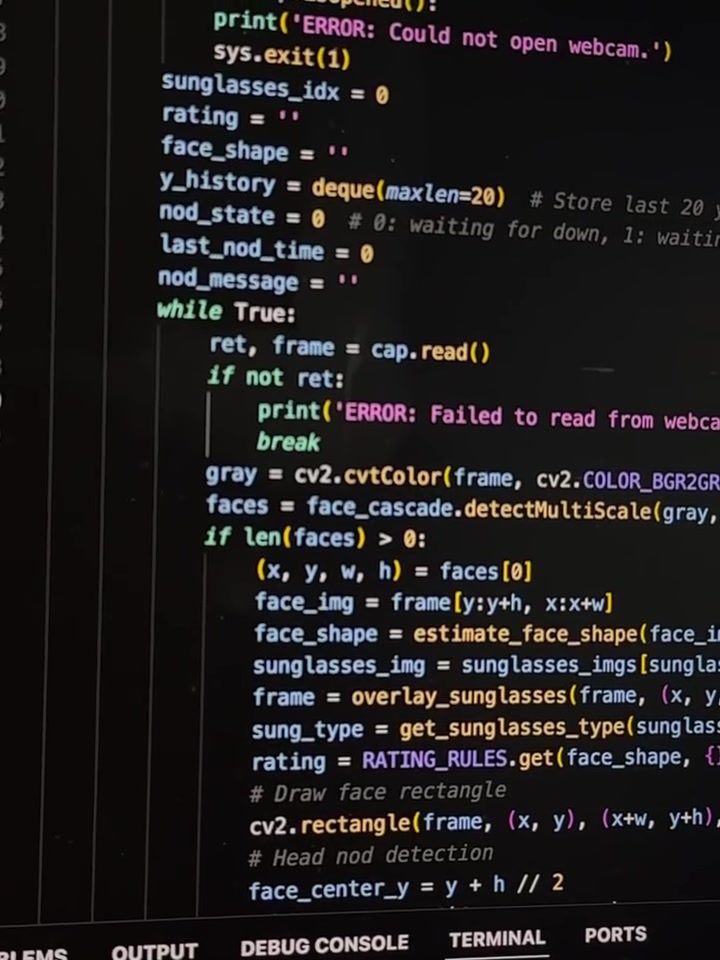
Computer Code for Face Detection and Overlaying Sunglasses
Face detection and image processing are powerful techniques in computer vision, and for those looking to create fun, interactive applications, overlying sunglasses on detected faces can be a great project to try. This code uses the popular OpenCV (cv2) library to accomplish this task.
Why This Matters
Face detection and image processing are foundational skills in computer vision and software development. These techniques are used in a variety of applications, from security systems and facial recognition to entertainment and augmented reality. Understanding how to implement face detection and overlay images can open up a world of possibilities for developers, allowing them to create engaging and interactive applications.
Implementation Details
The code showcased here does the following:
- Uses the OpenCV library for image processing.
- Detects faces in a webcam feed.
- Overlays sunglasses on the detected faces.
- Handles potential webcam access and processing issues with error handling.
The process leverages the power of OpenCV to handle image data and perform face detection. The specific code implementation involves using specialized functions such as cv2.VideoCapture for accessing the webcam feed, and cv2.CascadeClassifier for detecting faces.
Step-by-Step Breakdown
-
Initialization:
- Import the necessary libraries, such as
cv2(OpenCV) andnumpy. - Configure the webcam capture settings to access the camera feed.
- Import the necessary libraries, such as
-
Face Detection:
- Load a pre-trained face detection model, typically a Haar Cascade classifier.
- Use this model to detect faces in each frame captured from the webcam.
-
Overlaying Sunglasses:
- Identify the coordinates of the detected faces.
- Load an image of sunglasses and resize it to fit the detected face.
- Overlay the sunglasses image onto the webcam feed at the detected face coordinates.
-
Error Handling:
- Implement error handling to manage common issues, such as webcam access problems or processing errors.
- Display appropriate error messages to assist users in troubleshooting.
Practical Tips for Face Detection and Overlaying Sunglasses
Knowing how to apply these concepts in practice will help you implement them effectively in your projects.
Choosing the Right Model
The choice of face detection model is crucial. OpenCV provides various pre-trained models, but not all are equally effective. The Haar Cascade classifier, for example, is a good starting point due to its simplicity and reliability.
For more advanced applications, consider using neural network-based models like MTCNN (Multi-task Cascaded Convolutional Networks) or Dlib's face detector, which offer higher accuracy and better performance.
Optimizing Webcam Performance
Ensure your webcam is properly configured and accessible. Common issues include camera permission settings and driver compatibility. Test your webcam with basic video capture scripts before integrating it into more complex projects.
Enhancing Overlay Accuracy
Overlaying images like sunglasses accurately requires precise calculations. Use the bounding boxes returned by the face detection algorithm to position the sunglasses correctly. Adjust the size and transparency of the overlay to achieve a more natural look.
Important Takeaways
Face detection with OpenCV is a powerful and versatile technique. By understanding the basics of image processing and face detection, you can create a wide range of applications. Learning to overlay images, such as sunglasses, is just one example of how you can enhance your projects with interactive elements.
Conclusion
Face detection and image overlay are essential skills in computer vision. Whether you're building a fun project like overlaying sunglasses on webcam feeds or developing more complex applications, mastering these techniques will greatly enhance your capabilities as a developer. By following the steps outlined here and implementing error handling, you can create robust and engaging applications.
Watch the Reel
Questions readers ask
What is the OpenCV library and why is it used in face detection?
The OpenCV (Open Source Computer Vision Library) is an open-source computer vision and machine learning software library. It's widely used for face detection due to its powerful image processing capabilities and ability to integrate with Python. OpenCV provides pre-trained models like Haar Cascades and deep learning models that make face detection straightforward and efficient.
Can I use this project to create other kinds of image overlays?
Absolutely! The skills you gain from this project can be applied to create various image overlays. Whether you want to add hats, mustaches, or even more complex objects, the process involves similar steps of face detection and image manipulation. You can get creative with different images and filters to build unique applications.
What are some real-world applications of face detection technology?
Face detection technology has a wide range of real-world applications. It's commonly used in security systems for surveillance and access control. In the entertainment industry, it's used to create interactive experiences and augmented reality (AR) applications. Additionally, it's used in retail for customer analytics and personalized marketing, as well as in healthcare for patient monitoring and diagnostics.
What are Haar Cascades and how do they work in face detection?
Haar Cascades are a machine learning-based approach where a cascade function is trained from a lot of positive and negative images. It is then used to detect objects in other images. In face detection, Haar Cascades work by scanning an image and identifying patterns that match the trained model, which helps in detecting faces accurately and efficiently. This technique is implemented in the OpenCV library.
Do I need any previous experience with Python to start this project?
While some familiarity with Python can be helpful, this project is designed to be approachable for beginners. The article provides a step-by-step guide to help you understand the code and its implementation. You'll learn about libraries like OpenCV and gain practical experience in image processing and computer vision, making it a great starting point for beginners.
Can I use this project on different operating systems?
Yes, you can use this project on various operating systems. Python and the OpenCV library are cross-platform, meaning they work on Windows, macOS, and Linux. The code and instructions provided in the article should be compatible across these platforms, allowing you to create and run your face detection and sunglasses overlay application regardless of your operating system.
Related deep dives
Similar reads based on topic and creator.

Recent articles
Fresh deep dives from the latest Reels we unpacked.




Comments
Be the first to comment.