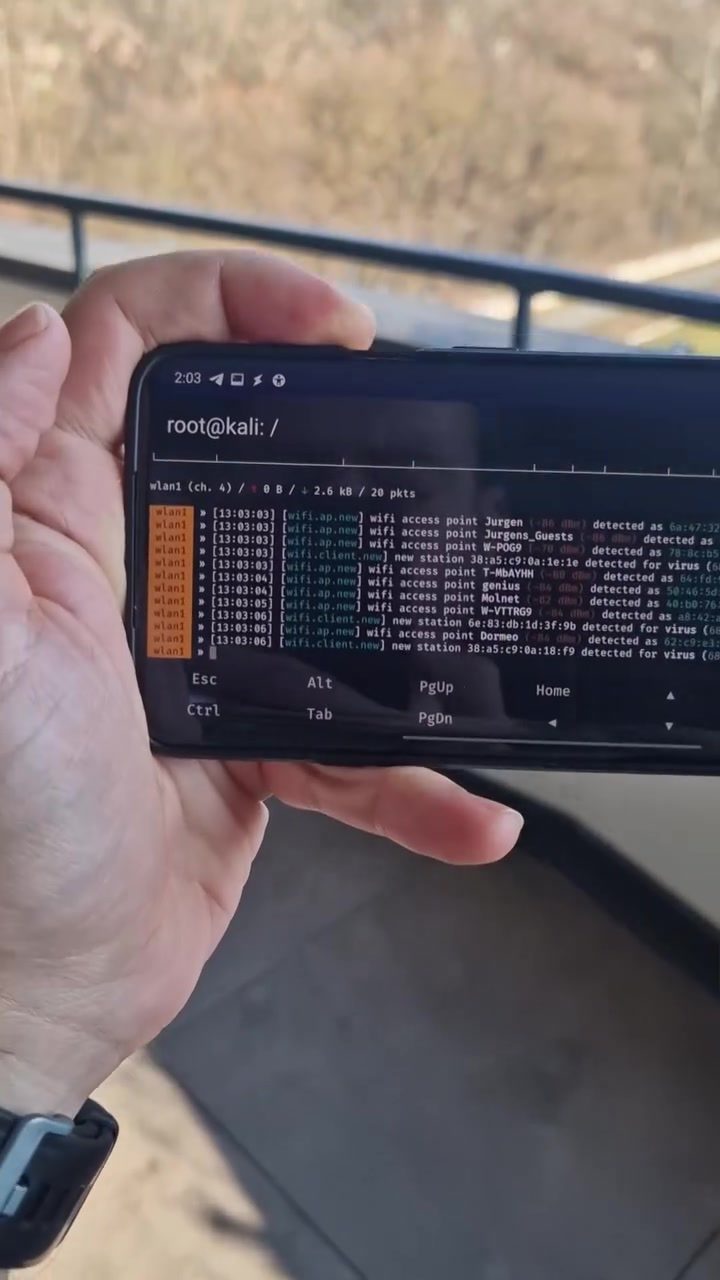
Active Wi-Fi Reconnaissance on Mobile with Bettercap
Active Wi-Fi reconnaissance involves actively probing a wireless network to gather detailed information. This technique is commonly used by security professionals and ethical hackers to identify vulnerabilities and assess network security. One of the tools that facilitates this process is Bettercap, a powerful and flexible tool for network reconnaissance and penetration testing.
Bettercap is renowned for its user-friendly interface and extensive features. It supports various types of network attacks, including Wi-Fi deauthentication, Wi-Fi rogue access points, and MiTM (Man-in-the-Middle) attacks. Bettercap can be installed and operated on a variety of operating systems, including Kali Linux, making it a versatile choice for both desktop and mobile environments.
Why This Matters
Active Wi-Fi reconnaissance is a critical aspect of network security. By actively scanning and probing a network, security professionals can identify vulnerabilities that might be exploited by malicious actors. This proactive approach helps in fortifying network defenses and ensuring that sensitive information remains secure.
In a mobile setting, the ability to perform network reconnaissance is particularly valuable. Security professionals often need to assess the security of networks on the go, whether for corporate audits, penetration testing, or incident response. Using tools like Bettercap on a smartphone equipped with a small Wi-Fi adapter enables professionals to conduct these assessments efficiently and discreetly.
Main Discussion
The Role of Wi-Fi Adapters in Mobile Reconnaissance
When performing active Wi-Fi reconnaissance on a mobile device, the choice of Wi-Fi adapter is crucial. The smallest and most versatile adapters are often preferred for their portability and ease of use. These adapters can be easily connected to a smartphone, transforming it into a powerful reconnaissance tool.
Bettercap simplifies the process by integrating seamlessly with these adapters, allowing users to leverage their full potential. Whether the adapter is plugged into a smartphone or a tablet, Bettercap provides the necessary tools to perform a comprehensive network scan.
Utilizing Bettercap for Network Scanning
Bettercap’s interface is designed to be intuitive, making it accessible even to those who are new to network reconnaissance. The tool provides a wide range of commands and options, allowing users to customize their scans according to specific needs.
For instance, users can configure Bettercap to scan for hidden networks, gather detailed information about detected networks, and even perform deauthentication attacks to capture handshake packets. The versatility of Bettercap makes it a go-to tool for security professionals who need to conduct thorough network assessments.
Setting Up Bettercap on a Smartphone
Setting up Bettercap on a smartphone involves a few key steps. First, ensure that the device is running a compatible operating system, such as Kali Linux, which is optimized for security and penetration testing tasks. Once the operating system is in place, the next step is to install Bettercap and any necessary drivers for the Wi-Fi adapter.
The process can be streamlined by following detailed guides and tutorials available online. These resources provide step-by-step instructions on installing and configuring Bettercap, ensuring that users can get started quickly and efficiently.
Benefits of Mobile Reconnaissance
Conducting active Wi-Fi reconnaissance on a smartphone offers several benefits. The portability of smartphones allows security professionals to assess networks in various locations, making it ideal for on-the-go assessments. Additionally, the use of small Wi-Fi adapters ensures that the setup remains discreet, reducing the likelihood of detection by potential targets.
Practical Tips
Choosing the Right Wi-Fi Adapter
When selecting a Wi-Fi adapter for mobile reconnaissance, consider factors such as size, compatibility, and range. The smallest adapters are often the most convenient, but they may have limited range. Ensure that the adapter is compatible with your device and supports the necessary protocols for your intended scans.
Ensuring Legal and Ethical Compliance
Before conducting any form of network reconnaissance, it is essential to obtain proper authorization. Unauthorized access to networks is illegal and unethical. Always ensure that you have explicit permission to scan and test the network in question. This not only protects you from legal repercussions but also ensures that your actions are ethical and responsible.
Regularly Updating Tools
Keep your tools and software up to date to take advantage of the latest features and security patches. Bettercap, like any other tool, receives regular updates that enhance its functionality and address potential vulnerabilities. Regular updates ensure that your reconnaissance activities remain effective and secure.
Important Takeaways
Active Wi-Fi reconnaissance using Bettercap on a smartphone is a powerful technique for assessing network security. The combination of a versatile tool like Bettercap and a portable device like a smartphone provides unparalleled flexibility and convenience. By following best practices and ensuring legal compliance, security professionals can conduct thorough and effective network assessments on the go.
Conclusion
Active Wi-Fi reconnaissance is an essential component of network security. By utilizing tools like Bettercap and small Wi-Fi adapters on smartphones, security professionals can conduct comprehensive network assessments in various locations. The portability and versatility of smartphones make them an ideal platform for this purpose, enabling professionals to stay ahead of potential threats and ensure the security of critical networks.
Watch the Reel
Questions readers ask
What is Bettercap and how is it used for Wi-Fi scanning on mobile devices?
Bettercap is a robust tool designed for active Wi-Fi reconnaissance. It can be installed on mobile devices, allowing security professionals to scan and assess network vulnerabilities by probing wireless networks and gathering detailed information. Its compatibility with mobile devices makes it an ideal tool for on-the-go network security assessments.
Which types of network attacks does Bettercap support?
Bettercap supports a wide range of network attacks, including Wi-Fi deauthentication, which forces devices to disconnect from a network, and Wi-Fi rogue access points, which mimic legitimate networks to intercept data. Additionally, it supports Man-in-the-Middle (MiTM) attacks, allowing for the interception and potential manipulation of data between parties.
How can I install Bettercap on my mobile device for network scanning?
Bettercap can be installed on a variety of operating systems, including Kali Linux. For mobile devices, you may need to set up a compatible Linux environment, such as Kali NetHunter, which is designed for Android devices. Once the environment is set up, you can follow the installation instructions specific to your device and operating system.
Why is Bettercap considered a versatile choice for network security assessments?
Bettercap's versatility lies in its extensive features and compatibility. It supports a wide range of network attacks, making it useful for various types of network assessments. Its compatibility with multiple operating systems, including mobile devices, allows users to conduct security assessments in diverse environments.
What kind of Wi-Fi adapter is recommended for network reconnaissance with Bettercap?
For effective network reconnaissance with Bettercap, a USB Wi-Fi adapter that supports monitor mode and packet injection is recommended. This type of adapter allows Bettercap to capture and analyze network traffic more efficiently, providing deeper insights into network vulnerabilities. Examples include adapters with Atheros or Realtek chipsets.
Can Bettercap be used for passive network reconnaissance as well?
Bettercap is primarily designed for active network reconnaissance, where it actively probes and interacts with the network to gather information. While it excels in active techniques, it also includes features for passive monitoring, such as capturing and analyzing network traffic, which can be useful for identifying network vulnerabilities without actively engaging with the network.
Recent articles
Fresh deep dives from the latest Reels we unpacked.




Comments
Be the first to comment.