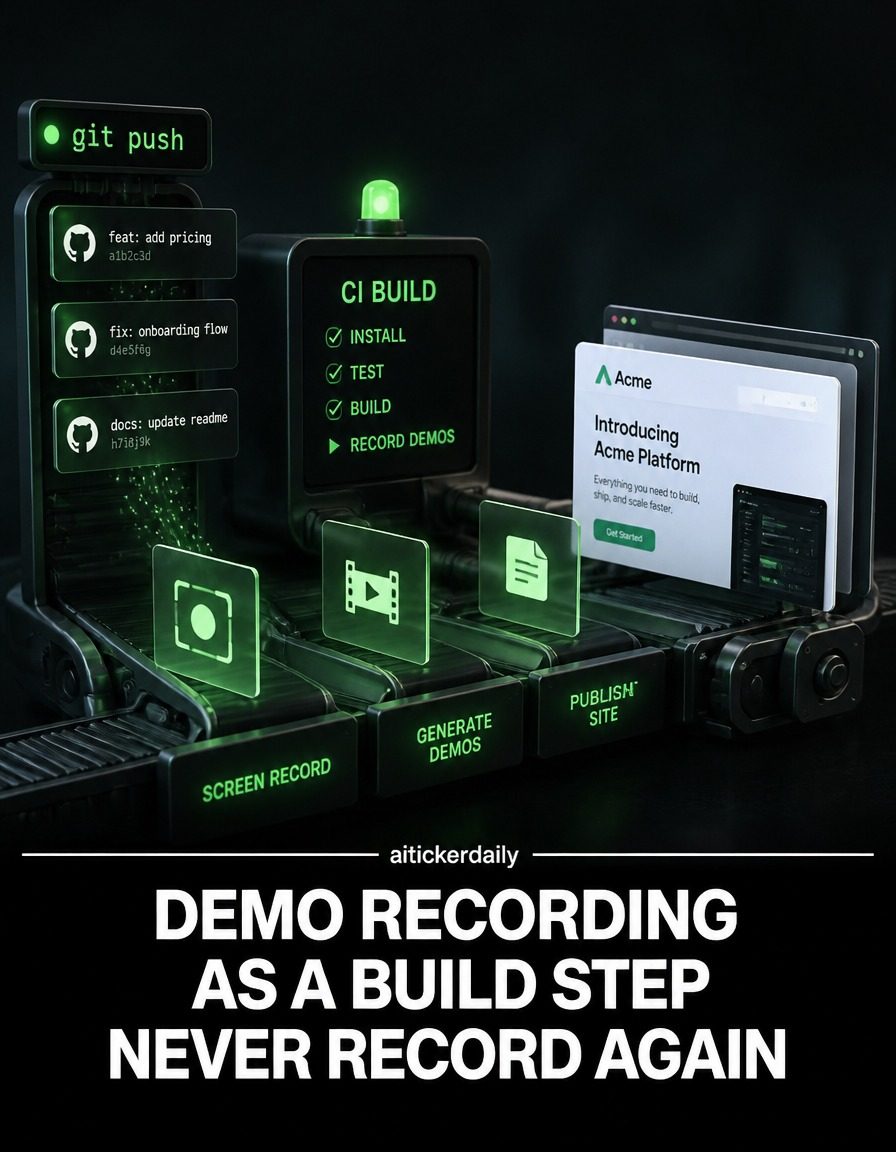
Demo Recording as a Build Step
Automating demo recording within the build process is a game-changer for software development teams. By integrating demo creation into the build process, teams can ensure that demos are always up-to-date and reflect the latest changes in the product. This approach not only saves time but also enhances the reliability and relevance of product demonstrations.
Why This Matters
Recording product demos manually is time-consuming and repetitive. Developers often find themselves spending hours creating demos that quickly become outdated as new features are added and bugs are fixed. By automating this process, teams can focus on more critical tasks, such as improving the product and addressing user feedback. Furthermore, having always-current demos ensures that potential users and stakeholders see the most recent version of the product, which can significantly impact their decision-making process.
Main Discussion
Understanding the Concept
Automating demo recording involves incorporating the demo creation process into the existing build pipeline. This means that every time a new build is generated, a corresponding demo is also created. The demo is built using code and seeded data, ensuring it accurately represents the current state of the software. This approach eliminates the need for repetitive manual recordings.
The Role of AI
Artificial Intelligence (AI) plays a crucial role in automating demo recording. AI can be used to generate different demo variants for various user personas. For example, a demo for a technical user might focus on advanced features, while a demo for a non-technical user might highlight ease of use. By using AI, teams can create personalized demos that cater to the specific needs and interests of different user groups.
How It Works
The process of automating demo recording typically involves several steps:
-
Code and Seeded Data: The demo is created using the same code and data that are used to build the product. This ensures that the demo is an accurate representation of the current version of the software.
-
Build Pipeline Integration: The demo creation process is integrated into the existing build pipeline. This means that every time a new build is generated, a corresponding demo is also created.
-
Automated Generation: The demo is generated automatically, without the need for manual intervention. This saves time and ensures that the demo is always up-to-date.
-
Variant Generation: AI is used to generate different demo variants for various user personas. These variants can be customized to highlight specific features or aspects of the software.
Key Steps in the Process
-
Set Up a Build Pipeline: Ensure that your build pipeline is set up to handle the demo recording as a build step. This might involve configuring your continuous integration/continuous deployment (CI/CD) system to include demo generation.
-
Use Seeded Data: Use seeded data to generate demos that accurately reflect the current state of the software. This data can include user inputs, configuration settings, and other relevant information.
-
Automate with Code: Write code to automate the demo recording process. This code should be integrated into the build pipeline, so that a demo is generated every time a new build is created.
-
Leverage AI for Personalization: Use AI to generate demo variants for different user personas. This can involve creating custom scripts or using pre-built AI tools to generate personalized demos.
Practical Tips
-
Start Small: Begin by automating demo recording for a single feature or module. Once you have a working system in place, you can gradually expand it to cover the entire product.
-
Use Version Control: Ensure that your demo recording process is version-controlled, so that you can track changes and roll back if necessary. This can be done using a version control system like Git.
-
Monitor and Test: Regularly monitor and test the automated demo recording process to ensure that it is working correctly. This can involve running test builds and checking the generated demos for accuracy and completeness.
-
Leverage AI Tools: Explore AI tools and platforms that can help you automate demo recording and generate personalized demos. Some of these tools offer pre-built scripts and templates that can save you time and effort.
Important Takeaways
-
Efficiency: Automating demo recording can significantly reduce the time and effort required to create and update product demos.
-
Accuracy: By integrating demo creation into the build process, you can ensure that your demos are always up-to-date and accurate.
-
Personalization: AI can be used to generate demo variants for different user personas, making your demos more relevant and engaging.
-
Focus on Core Tasks: Automating demo recording allows your team to focus on more critical tasks, such as product development and user support.
Conclusion
Automating demo recording as a build step is a powerful way to streamline the software development process. By integrating demo creation into the build pipeline, teams can ensure that their demos are always up-to-date and accurate. This approach not only saves time and effort but also enhances the reliability and relevance of product demonstrations. By leveraging AI to generate personalized demo variants, teams can create demos that cater to the specific needs and interests of different user groups. Whether you're a small startup or a large enterprise, automating demo recording can help you stay ahead of the competition and deliver a better user experience. So, consider integrating demo recording into your build process and see the difference it can make to your product development cycle.
Watch the Reel
Questions readers ask
What are the key benefits of automating demo recording in the build process?
Automating demo recordings helps maintain current product demonstrations, and this reduces the time developers spend on repetitive tasks. Additionally, it ensures that stakeholders always see the most recent features and updates, enhancing the relevance of the demos.
How does integrating demo recording into the build process improve efficiency?
By making demo creation a part of the build process, teams can ensure that demos are always up-to-date without manual intervention. This minimizes the likelihood of outdated demos and allows developers to focus on core development tasks, thereby optimizing the use of resources.
What is the difference between manual and automated demo recording?
Manual demo recording is a time-consuming process that often results in demos becoming outdated quickly. Automated demo recording, on the other hand, integrates with the build process to create demos that are always current with the latest product changes, making the process more reliable and less labor-intensive.
Which tools can be used for CI/CD demo automation?
There are several tools available for CI/CD demo automation, such as Selenium for browser automation, Puppeteer for headless browser testing, and specialized demo automation tools like DejaClick. These tools can be integrated into your build pipeline to automate the demo recording process.
What steps are involved in automating demo builds?
Automating demo builds typically involves setting up a script or pipeline that triggers demo recording as part of the build process. This includes configuring the build system to capture screen recordings or other demo materials, ensuring that the demo reflects the latest build, and storing the demo in an accessible location for stakeholders.
How can demo automation help in addressing user feedback?
With automated demo recordings, teams can quickly generate updated demos that incorporate user feedback and new features. This allows for more frequent and timely demonstrations, helping stakeholders understand the progress and improvements made based on their input.
What are some best practices for demo recording workflows?
Best practices for demo recording workflows include integrating demo creation into the build process, using reliable automation tools, and ensuring that demos are stored and accessed easily. Additionally, regular testing and updates to the demo automation scripts can help maintain the accuracy and relevance of the demos over time.
Recent articles
Fresh deep dives from the latest Reels we unpacked.




Comments
Be the first to comment.