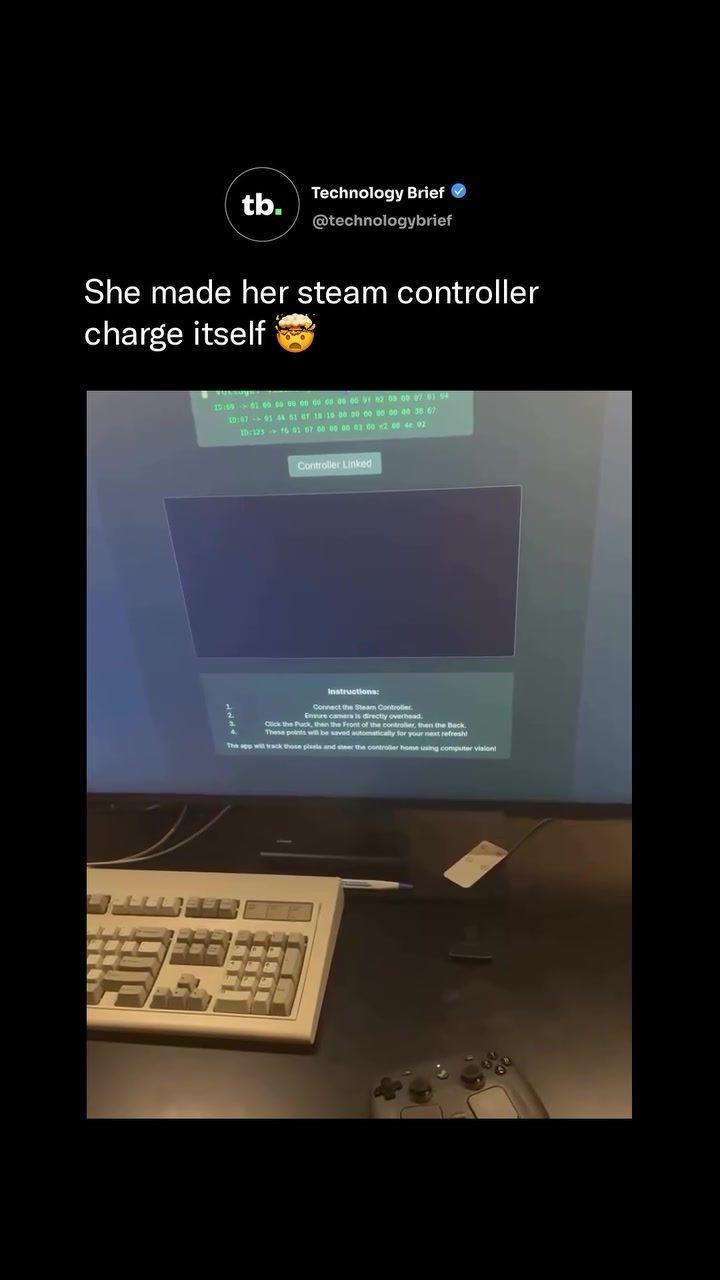
Steam Controller Charging
The Steam Controller, a gaming accessory from Valve, can now charge itself back to its magnetic puck. Developer Ray Foss (@fossprime) built an open-source browser tool to achieve this. Auto-Charge Vision Tracker leverages an overhead camera and OpenCV to monitor the controller's position in real time.
The tool's innovative approach involves using the Steam Controller's built-in vibration motors to propel it toward the charging puck. This eliminates the need for additional motors or robotic arms. The controller gets within approximately 150 pixels of the puck before docking gently.
Why this matters
The ability of Steam Controllers to charge themselves is significant for several reasons. It shows how creativity and technological ingenuity can enhance user experience. This tool also simplifies the process of charging, making it less about manual intervention and more about seamless automation.
The Steam Controller
Before diving in, let's take a closer look at the Steam Controller. The Steam Controller is a versatile gaming accessory developed by Valve. It features a unique design with dual trackpads and customizable buttons, offering users a precise and immersive gaming experience. The controller can be charged via USB-C or a magnetic charging puck, which also functions as a wireless receiver.
Features
- Trackpads: Dual trackpads provide precise control and accurate tracking.
- Customizable Buttons: The controller has multiple buttons that can be remapped to suit the user's preferences.
- Charging Options: Users can choose between USB-C and a magnetic charging puck for convenient charging.
- Wireless Receiver: The magnetic puck doubles as a wireless receiver, ensuring a stable connection during gameplay.
The Auto-Charge Vision Tracker
Auto-Charge Vision Tracker is the core of this innovation. The app was created by Ray Foss. It allows the controller to return to the magnetic charging puck independently. This setup relies on an overhead camera and OpenCV to track the controller's position.
How It Works
The system operates on a few key principles:
- Camera Monitoring: An overhead camera captures real-time footage of the controller. This footage is fed into the Auto-Charge Vision Tracker app.
- OpenCV Processing: OpenCV processes the video feed, enabling the system to recognize the controller's position and movement.
- Directional Control: The app uses the controller's vibration motors to push it in the right direction. It fires rapid haptic pulses to guide the controller forward and turn it.
- Precision Docking: The system slows down once the controller gets within 150 pixels of the puck, ensuring a gentle and precise docking.
Setup Process
Setting up the Auto-Charge Vision Tracker is straightforward:
- Connect the Controller: Connect the Steam Controller to the system.
- Camera Positioning: Ensure the overhead camera is positioned directly above the controller and the charging puck.
- Marking Points: On the screen, mark three points: the charging puck, the front of the controller, and the back.
- Save Positions: These positions are saved for future use, making the setup process quick and easy.
Practical Tips
Here are some practical tips to ensure a smooth setup and operation of the Auto-Charge Vision Tracker:
Camera Placement
The overhead camera is crucial for the system's accuracy. Ensure it's positioned directly above the controller and the charging puck to get a clear, unobstructed view. This will help the system track the controller's movements accurately.
Surface Considerations
Place the controller and the charging puck on a smooth, flat surface. This ensures that the controller can move easily and without any obstacles. The smoother the surface, the more precise the tracking and movement will be.
Fine-Tuning the Sensitivity
The sensitivity of the vibration motors can be adjusted to suit your setup. If the controller is not moving as expected, you may need to increase the sensitivity. Conversely, if it's moving too aggressively, lower the sensitivity for a smoother docking process.
Important Takeaways
- Innovative Use of Existing Features: The Auto-Charge Vision Tracker shows how the built-in vibration motors of the Steam Controller can be repurposed for more than just haptic feedback. They can be used to propel the controller, making it a versatile tool.
- Open-Source Availability: The project is open-source, meaning anyone can try it out and contribute to its development. This fosters a community-driven approach to innovation.
- User-Friendly Setup: The setup process is user-friendly, requiring only a few steps to get the system up and running. This makes it accessible to a wide range of users, regardless of technical expertise.
- Environmentally Friendly: By ensuring the controller returns to the charging puck, the system promotes efficient energy use and reduces the need for constant manual intervention.
Conclusion
The ability of the Steam Controller to charge itself back to its magnetic puck is a testament to technological innovation and creativity. It simplifies the charging process, making it more convenient and efficient. For Steam Controller users, this tool represents a significant upgrade to their gaming experience. The open-source nature of the Auto-Charge Vision Tracker encourages further development and community involvement, paving the way for even more advancements in the future.
Watch the Reel
Questions readers ask
What is the Auto-Charge Vision Tracker and how does it work with the Steam Controller?
The Auto-Charge Vision Tracker is an innovative system created by developer Ray Foss. It uses an overhead camera and OpenCV to track the position of the Steam Controller in real time. It then uses the controller's built-in vibration motors to guide it back to its magnetic charging puck, ensuring seamless and automatic charging.
What hardware is required to set up the Auto-Charge Vision Tracker?
To set up the Auto-Charge Vision Tracker, you'll need a Steam Controller, a magnetic charging puck, an overhead camera, and a computer or device capable of running the open-source browser tool. No additional motors or robotic arms are required, as the system leverages the controller's vibration motors for movement.
How does the Auto-Charge Vision Tracker ensure the Steam Controller docks gently with the charging puck?
The Auto-Charge Vision Tracker is programmed to stop the controller when it gets approximately 150 pixels away from the charging puck. This precision ensures that the controller docks gently, preventing any damage or excessive wear.
Can the Auto-Charge Vision Tracker be used with other controllers besides the Steam Controller?
The Auto-Charge Vision Tracker is specifically designed for the Steam Controller and may not be compatible with other controllers. The system relies on the unique features of the Steam Controller, such as its built-in vibration motors and magnetic charging puck.
Is the Auto-Charge Vision Tracker software open-source?
Yes, the Auto-Charge Vision Tracker is an open-source project. This means that the software is freely available, and users can modify and improve upon the code as needed. The open-source nature of the project encourages community contributions and enhancements.
What are the benefits of using the Auto-Charge Vision Tracker for Steam Controller charging?
The Auto-Charge Vision Tracker offers several benefits, including automatic and hands-free charging, reduced wear and tear on the controller, and the convenience of not having to manually place the controller on the charging puck. It also demonstrates the potential of creative solutions in enhancing user experience through technological innovation.
How does the Auto-Charge Vision Tracker utilize OpenCV in its operation?
OpenCV, or Open Source Computer Vision Library, is used in the Auto-Charge Vision Tracker to process the video feed from the overhead camera. This allows the system to track the Steam Controller's position in real time, enabling it to guide the controller back to the charging puck accurately and efficiently.
Related deep dives
Similar reads based on topic and creator.

Recent articles
Fresh deep dives from the latest Reels we unpacked.




Comments
Be the first to comment.