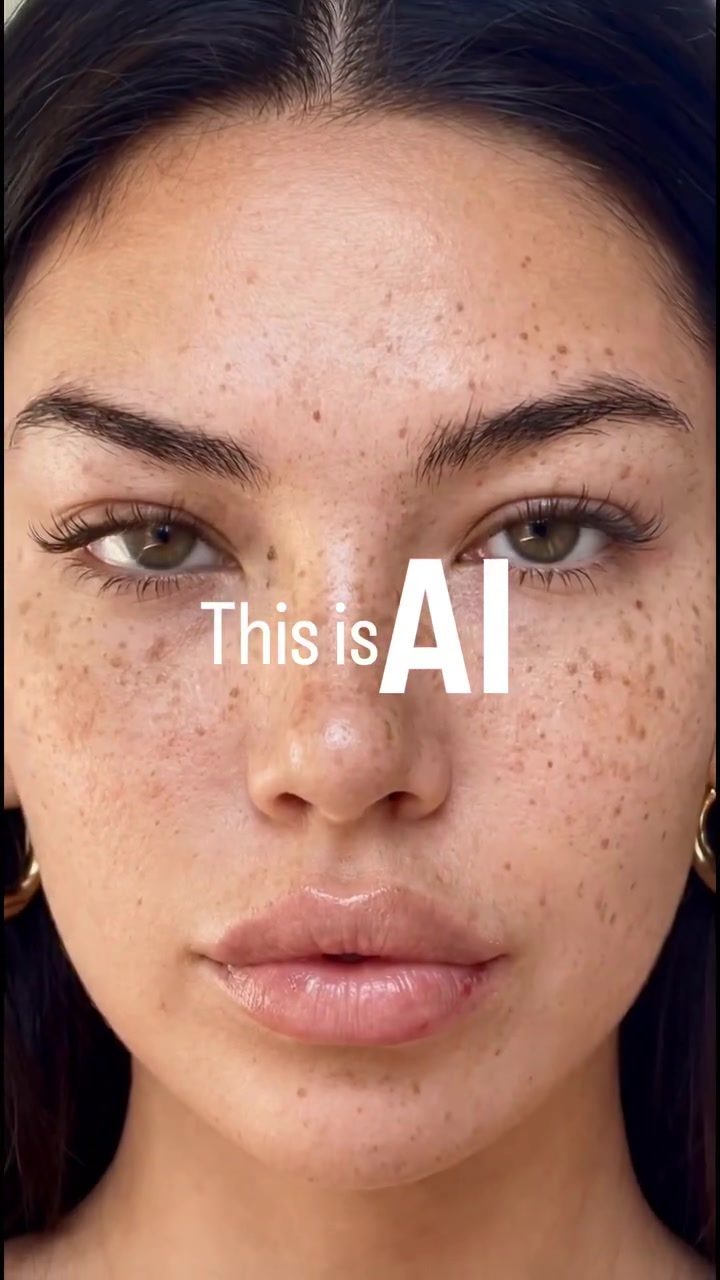
AI Image Refinement Workflow
Creating high-realism AI images involves a structured, multi-step process that focuses on texture, imperfections, and natural movement. This workflow, built entirely inside, starts with a base image and uses a combination of AI tools and techniques to achieve a final, polished product. This level of realism is becoming increasingly standard, with applications ranging from AI-generated models to UGC-style advertising, realistic AI influencers, and scalable digital content.
Why This Matters
Mastering the AI image refinement workflow is crucial for anyone looking to create realistic, high-quality digital content. Whether you're an artist, a marketing professional, or a content creator, understanding this process can help you produce more compelling and believable visuals. The workflow described here is used in various applications, including:
- AI-generated models
- UGC-style advertising
- Realistic AI influencers
- Scalable digital content
Main Discussion
Base Image and Prompt Refinement
The workflow begins with a base image, which serves as the foundation for the entire process. Using a real reference image helps anchor the realism and composition of the final product. This base image is then refined using ChatGPT to generate a precise modification prompt. The prompt is based on specific requirements for the new model, ensuring that the final output meets the desired specifications.
Skin Detail Enhancement
Once the base image and prompt are refined, the next step involves reintroducing skin detail. This process is crucial for enhancing the realism of the digital human. Tools like Skin Enhancer are used to add intricate details to the skin, making it look more natural and lifelike.
Image Upscaling
After skin detail enhancement, the image is upscaled to preserve texture at higher resolutions. This step ensures that the final output is suitable for various digital platforms. The upscaling process helps maintain the high level of detail and realism achieved in the previous steps.
Animation
The image is then animated using tools like Kling 2.6. Keeping the motion minimal is essential to avoid breaking the realism of the digital human. Natural movement is crucial for making the AI-generated content believable and immersive.
Video Upscaling
The final step in the workflow involves using a video upscaler to create a clean, platform-ready result. This step ensures that the final video is of high quality and suitable for various platforms. The video upscaler helps enhance the overall realism and quality of the content, making it more engaging and believable.
Tools and Techniques
Several tools and techniques are mentioned in the workflow. These include:
- Nano Banana Pro: Used for creating the base image with a real reference image.
- Skin Enhancer: Reintroduction of skin detail.
- Kling 2.6: Animation of the image with minimal motion.
- Video Upscaler: Final step to create a clean, platform-ready result.
Commenting for Exact Workflow
To help others achieve similar results, the workflow details can be obtained by commenting "UGC". This will provide access to:
- The exact image prompt
- The full AI UGC workflow, including steps from reference image to video upscale
Practical Tips
- Start with a High-Quality Base Image: The quality of the base image is crucial for the final output. Use a real reference image to anchor the realism and composition.
- Generate Precise Modification Prompts: Use AI tools like ChatGPT to generate precise modification prompts based on your specifications.
- Enhance Skin Detail: Use specialized tools to reintroduce skin detail, making the digital human look more natural and lifelike.
- Upscale the Image: Preserve texture at higher resolutions to ensure the final output is suitable for various digital platforms.
- Minimize Motion: Keep the motion minimal during animation to avoid breaking the realism of the digital human.
- Use a Video Upscaler: Finalize the video with a video upscaler to create a clean, platform-ready result.
Important Takeaways
Creating high-realism AI images involves a series of careful, detailed steps. From base image and prompt refinement to skin detail enhancement, image upscaling, animation, and video upscaling, each step plays a crucial role in achieving the final output. Tools like Nano Banana Pro, Skin Enhancer, Kling 2.6, and video upscalers are essential for this process. Understanding and mastering this workflow can help you create more compelling and believable digital content.
Conclusion
The AI image refinement workflow is a structured, multi-step process that involves various tools and techniques. By following this workflow, you can create high-realism AI images suitable for a wide range of applications, from AI-generated models to UGC-style advertising. The key to success lies in attention to detail, precise modification prompts, and the use of specialized tools for each step of the process. As this level of realism becomes standard, mastering this workflow will be invaluable for content creators and professionals in the digital landscape.
Watch the Reel
Questions readers ask
What are the initial steps in the AI image refinement workflow?
The AI image refinement workflow begins with a base image. The initial steps involve selecting a suitable base image and defining the desired outcome. This could be enhancing textures, adding intricate details, or improving natural movement to achieve a high-realism effect.
How does AI image upscale fit into the refinement process?
AI image upscale is a crucial step in the refinement process. It enhances the resolution of the base image, making it possible to add more detailed textures. This step is essential for achieving a high-realism outcome, as it allows for finer details to be incorporated.
What tools are commonly used in the AI image refinement workflow?
The AI image refinement workflow utilizes a combination of specialized AI tools and techniques. These tools help to enhance textures, refine details, and add natural imperfections. Common tools include AI upscaling software, texture enhancement algorithms, and detail refinement applications.
Why is adding imperfections important in AI image refinement?
Adding imperfections is a critical aspect of the AI image refinement workflow. It helps to make the final image appear more natural and lifelike. By mimicking real-world imperfections, the AI-generated image becomes more convincing and less artificial.
What are some applications of high-realism AI images?
High-realism AI images have a wide range of applications. They are used in creating AI-generated models, UGC-style advertising, and realistic AI influencers. Additionally, they are valuable in producing scalable digital content that requires a high degree of realism.
How can I improve the natural movement in AI-generated images?
To improve the natural movement in AI-generated images, focus on refining details that contribute to a sense of motion. This includes enhancing textures and adding subtle imperfections that mimic real-world movement. Utilizing advanced AI tools designed for detail refinement can greatly assist in this process.
What are the benefits of mastering the AI image enhancement steps?
Mastering the AI image enhancement steps allows for the creation of more compelling and high-quality digital content. It helps in producing realistic textures, adding intricate details, and achieving a high level of realism in AI-generated images. This skill is beneficial for artists, marketing professionals, and content creators alike.
Related deep dives
Similar reads based on topic and creator.




Recent articles
Fresh deep dives from the latest Reels we unpacked.




Comments
Be the first to comment.