Adobe Firefly: Revolutionizing Visual Content Creation
Adobe Firefly, a suite of creative tools powered by artificial intelligence, is transforming how visual content is created. With new partner models integrated into Firefly Boards, the platform now offers unprecedented flexibility and control, allowing creators to compare outputs from different AI models, such as GPT and Firefly, within a single workspace.
Why This Matters
The integration of AI into creative workflows is not just about enhancing visual aesthetics; it's about providing creators with powerful tools that can generate hyper-realistic details and offer stylized control. This shift is significant for professionals who need to produce high-quality content quickly and efficiently, especially in fields like graphic design, video editing, and digital art.
Firefly Boards: A Creative Command Center
Comparing AI Models
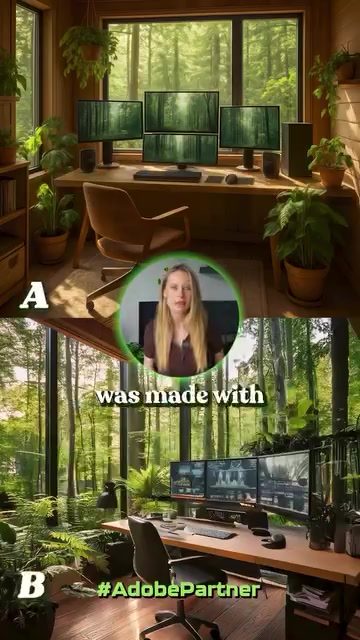
Firefly Boards allows creators to generate and compare results from different AI models using the same prompt. This feature is invaluable for understanding the nuances between various AI outputs. For instance, GPT offers hyper-realistic details, while Firefly provides a more stylized approach. This comparison helps in making informed decisions about which model best suits a project's needs.
Safety and Compliance
One of the standout features of Adobe Firefly is its commitment to safety and compliance. Firefly models are safe for commercial use and come with built-in content credentials. This ensures that all generated content is legally sound and ready for commercial applications without any legal hassles. Furthermore, Adobe's creator-first approach to AI means that Firefly does not train on customer content, providing an additional layer of security and privacy for creators.
Organization and Workflow Efficiency
Firefly Boards acts as a creative command center, allowing users to organize all their AI-generated content in one place. This feature enhances workflow efficiency by streamlining the creative process. Creators can easily switch between different models, compare results, and refine their work without having to navigate multiple platforms or tools. This centralized approach ensures that everything stays within the creative workflow, making the process more seamless and productive.
Expanding Creative Horizons
Text to Video and Beyond
Firefly Boards isn't just limited to image generation. It also includes Text to Video capabilities, allowing creators to generate video content directly from text prompts. This feature is particularly useful for video editors and content creators who need to produce video content quickly and efficiently.
Additional Creative Models
Firefly Boards is continually expanding its capabilities by integrating additional creative models like Ideogram and Pika. These models supercharge visual storytelling by offering new ways to create and manipulate visual content. From generating intricate designs to creating dynamic visual effects, these models provide a wide range of options for enhancing creative projects.
Practical Tips for Using Firefly Boards
Experiment with Different Models
One of the best ways to maximize the potential of Firefly Boards is to experiment with different AI models. Try generating the same prompt using various models like GPT and Firefly to see which one best meets your project's requirements. This hands-on approach will help you understand the strengths and limitations of each model.
Utilize Built-In Content Credentials
Always make use of the built-in content credentials to ensure that your generated content is safe for commercial use. This feature is particularly important for professionals who need to create content that adheres to legal and compliance standards.
Organize Your Workflow
Take advantage of the centralized command center feature to organize your creative workflow. Keep all your AI-generated content in one place, making it easier to compare, refine, and finalize your projects. This will not only save time but also enhance the overall quality of your work.
Important Takeaways
- Flexibility and Control: Firefly Boards offers unparalleled flexibility and control by allowing creators to compare outputs from different AI models within a single workspace.
- Commercial Safety: The platform ensures that all generated content is safe for commercial use with built-in content credentials, providing peace of mind for creators.
- Creator-First Approach: Adobe's commitment to a creator-first approach means that Firefly does not train on customer content, safeguarding privacy and security.
- Enhanced Workflow: The centralized command center feature streamlines the creative process, making it more efficient and productive.
Conclusion
Adobe Firefly and its integrated partner models in Firefly Boards are revolutionizing the way visual content is created. With features like hyper-realistic detail generation, stylized control, and built-in content credentials, Firefly provides creators with powerful tools to enhance their workflow and produce high-quality content. By experimenting with different models, utilizing content credentials, and organizing your workflow, you can make the most of this innovative platform and elevate your creative projects to new heights.
Watch the Reel
Questions readers ask
What are the key differences between Adobe Firefly and GPT in creating AI artwork?
Adobe Firefly focuses on providing stylized control and hyper-realistic details, while GPT offers a more text-based approach to image generation. Adobe Firefly is integrated into a suite of creative tools, allowing for seamless comparison and flexible use of different AI models.
How does Adobe Firefly enhance the quality of creative projects?
Adobe Firefly enhances creative projects by offering unprecedented flexibility and control over visual content. Its suite of AI-driven tools allows creators to generate high-quality images, compare outputs from different AI models, and achieve hyper-realistic results in a single workspace.
Can Adobe Firefly and GPT be used together for video content?
While Adobe Firefly and GPT excel in creating AI artwork, Adobe Firefly offers more extensive tools for video content creation. However, combining both tools can provide a comprehensive suite for both static and dynamic visual content, enhancing the overall creative workflow.
What makes Adobe Firefly stand out among other AI art tools?
Adobe Firefly stands out due to its integration of new partner models and the ability to compare outputs from different AI models within a single workspace. This makes it a powerful tool for professionals who need to produce high-quality, hyper-realistic content efficiently.
Which AI art tool is best for beginners?
For beginners, Adobe Firefly may be more approachable due to its intuitive interface and the ability to compare different AI models. Its suite of creative tools can help users understand the capabilities and limitations of AI in visual content creation, while still providing professional-level output.
Related deep dives
Similar reads based on topic and creator.

Recent articles
Fresh deep dives from the latest Reels we unpacked.




Comments
Be the first to comment.