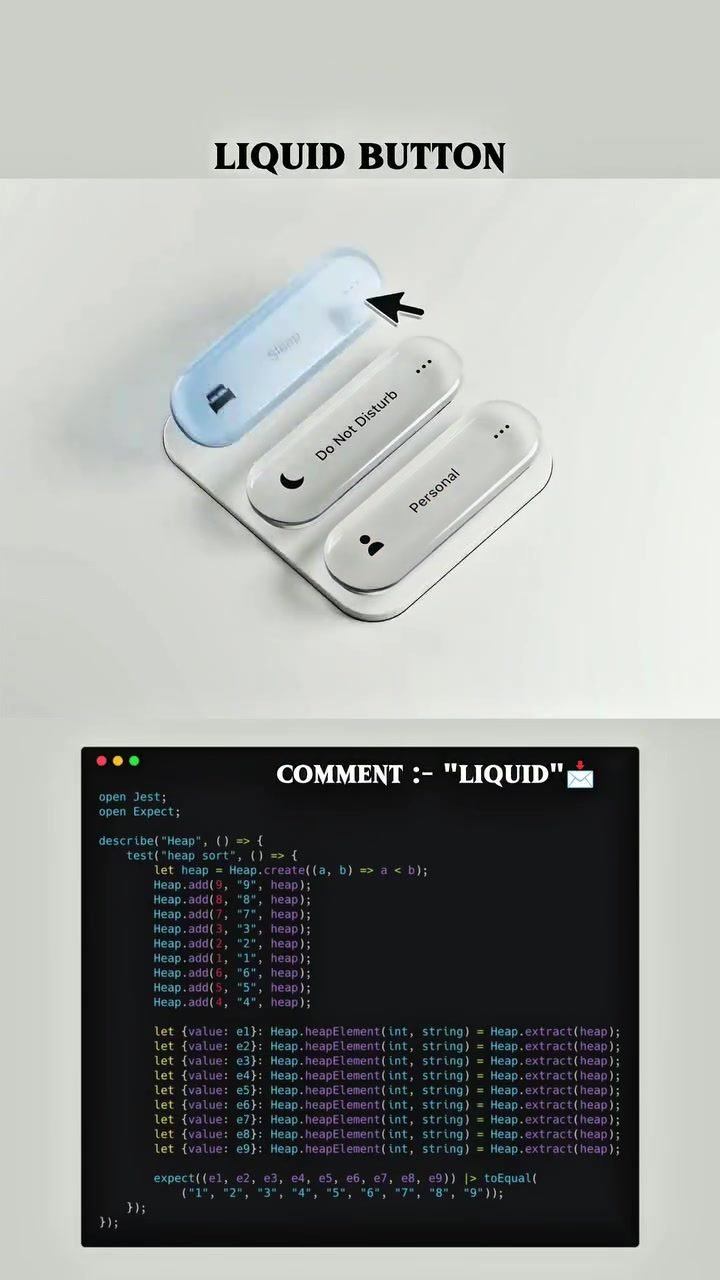
Liquid Button Animation and Heap Sort Algorithm
The Liquid Button animation showcases a stunning blend of digital craftsmanship and fluid design, bringing a sense of calm and satisfaction to the user experience. This concept, where every click feels like a ripple in water, is not just about aesthetics but also about the functional beauty of seamless transitions.
Context / Why this matters
In a world dominated by rigid interfaces, the Liquid Button animation stands out as a breath of fresh air. It represents a shift towards more intuitive and fluid interactions, making technology feel less mechanical and more natural. This design principle is especially valuable in user interfaces, where the goal is to create a smooth and enjoyable experience.
This animation is particularly relevant for those interested in motion design, user interface (UI) design, and visual art. It offers a glimpse into the intersection of technology and aesthetics, where functional design meets artistic expression.
Main discussion
The Concept of Liquid Button
The Liquid Button animation is inspired by the idea of fluidity and motion. Just as liquid flows smoothly, the design of the button ensures that every interaction feels fluid and natural. This concept is not just about visual appeal but also about user experience. The button's responsiveness and the smooth transitions create a satisfying interaction that feels almost therapeutic to watch and use.
The Role of Technology
Technology plays a crucial role in bringing the Liquid Button animation to life. The use of advanced algorithms and coding practices ensures that the animation is not just visually appealing but also functionally sound. The Liquid Button animation is a testament to the power of modern technology in enhancing user experience.
Heap Sort Algorithm in JavaScript
The JavaScript code snippet featured in the visualization illustrates a heap sort algorithm. This algorithm is a comparison-based sorting technique based on a Binary Heap data structure. It is particularly useful for its efficiency in terms of both time and space complexity. The code snippet provided in the animation demonstrates the implementation of heap sort, making it a valuable resource for those looking to understand or implement this algorithm.
Heap Sort in Practical Use
Heap sort is a versatile algorithm that can be applied in various scenarios. It is often used in situations where memory usage needs to be optimized. The algorithm works by building a heap from the list of elements and then repeatedly extracting the maximum element from the heap, building a sorted list. This process ensures that the elements are sorted in ascending order.
Code Explanation
The code snippet provided in the animation includes several key functions and operations:
Heap.create(a, b => a < b): This function creates a new heap with a custom comparator.Heap.add(index, value, heap): This function adds an element to the heap.Heap.extract(heap): This function extracts the maximum element from the heap.Heap.heapElement(int, string): This function retrieves an element from the heap.
Practical Tips
If you are looking to implement the Liquid Button animation or the heap sort algorithm, here are some practical tips to get you started:
- Understand the Basics: Before diving into complex animations, ensure you have a solid understanding of the basic principles of motion design and user interface design.
- Experiment with Code: Play around with different code snippets and algorithms to see what works best for your project. The provided JavaScript code snippet is a great starting point for understanding heap sort.
- Iterate and Improve: Digital craftsmanship is all about iteration. Don't be afraid to experiment with different designs and algorithms to achieve the perfect balance between technology and fluidity.
- Focus on User Experience: Remember that the ultimate goal is to create a satisfying user experience. Pay close attention to how users interact with your design and make adjustments as needed.
Tools and Resources
To create similar animations, you might need a variety of tools and resources:
- Design Software: Tools like Adobe After Effects, Blender, or Sketch can help you create fluid and responsive animations.
- Coding Environments: Integrated development environments (IDEs) like Visual Studio Code or Sublime Text can be useful for writing and testing your code.
- Learning Platforms: Online courses and tutorials on platforms like Coursera, Udemy, or Codecademy can provide valuable insights into motion design, UI design, and coding practices.
Important Takeaways
- Fluidity in Design: The Liquid Button animation demonstrates how fluidity can enhance user experience. By making interactions feel smooth and natural, you can create a more engaging and satisfying interface.
- Power of Technology: Advanced algorithms and coding practices are essential for bringing innovative designs to life. Understanding and implementing these technologies can significantly enhance your projects.
- Iterative Process: Digital craftsmanship is an iterative process. Experimentation, testing, and improvement are key to achieving the perfect balance between technology and aesthetics.
Conclusion
The Liquid Button animation and the heap sort algorithm are prime examples of how technology and design can come together to create something both functional and visually appealing. By understanding the principles behind these concepts, you can enhance your own projects, making them more intuitive, responsive, and satisfying to use. Whether you are a motion designer, a UI designer, or a developer, embracing fluidity and digital craftsmanship can elevate your work and create a more enjoyable experience for users.
Watch the Reel
Questions readers ask
What is the Liquid Button animation and how does it enhance user experience?
The Liquid Button animation is a design feature that creates a ripple-like motion when a button is clicked, similar to the effect of dropping a pebble into water. This fluid motion enhances user experience by providing a sense of calm and satisfaction, making digital interactions feel more natural and intuitive.
How does the Liquid Button animation relate to the Heap Sort algorithm?
The Heap Sort algorithm is mentioned as a potential application for the Liquid Button animation. While the article doesn't delve into the specifics, it suggests that the animation could visually explain the process of sorting elements in a heap, making complex data structures more accessible and engaging for users.
What makes the Liquid Button animation stand out in UI design?
The Liquid Button animation stands out due to its unique blend of motion design, UI design, and visual art. It transforms rigid interfaces into fluid, intuitive experiences, making technology feel more approachable and less mechanical.
Can the Liquid Button animation be customized for different types of digital interactions?
Yes, the Liquid Button animation can be tailored to various digital interactions. Its adaptability allows for personalized sort animations and other dynamic visual explanations, enhancing the overall user experience.
How does the Liquid Button animation contribute to seamless digital interactions?
The Liquid Button animation contributes to seamless digital interactions by providing smooth and satisfying transitions. Each click creates a ripple effect, giving users immediate feedback and a sense of control, thus making the interaction feel more cohesive and enjoyable.
What role does visual art play in the Liquid Button animation?
Visual art in the Liquid Button animation serves to create a more engaging and aesthetically pleasing user interface. By incorporating fluid motion design, it transforms what could be a mundane interaction into a visually stimulating experience, blurring the lines between technology and art.
Why is the Liquid Button animation considered a valuable design principle for user interfaces?
The Liquid Button animation is considered valuable because it promotes a shift towards more intuitive and fluid user interactions. By making technology feel less mechanical, it helps create a smoother, more enjoyable user experience, which is crucial for designing appealing and effective interfaces.
Recent articles
Fresh deep dives from the latest Reels we unpacked.




Comments
Be the first to comment.