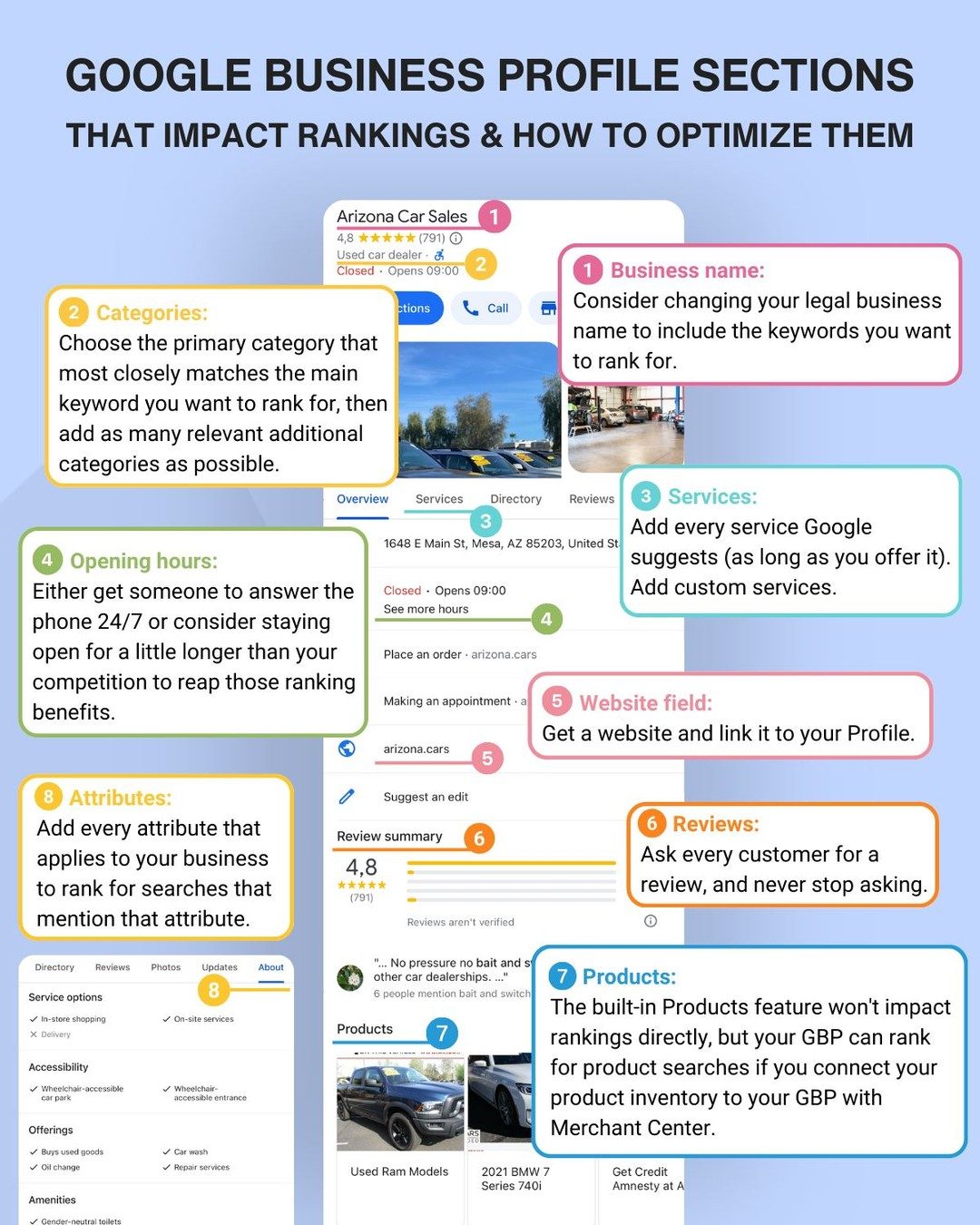
Google Business Profile Optimization
Google Business Profile (GBP) is a powerful tool for businesses to manage their online presence, engage with customers, and improve local search rankings. By optimizing the various sections of a GBP, businesses can enhance their visibility, attract more customers, and ultimately drive growth. Here’s a comprehensive guide on how to optimize your Google Business Profile to maximize its impact.
Why this matters
Optimizing your GBP can significantly boost your local search rankings, making it easier for potential customers to find your business. This optimization not only increases visibility but also builds trust and credibility with customers, as a well-maintained profile signals professionalism and reliability.
How to Optimize Your Google Business Profile
Business Name
The business name on your GBP is one of the most critical elements. Consider changing your legal business name to include relevant keywords that you want to rank for. This strategy can yield significant ranking gains and make your business more discoverable in local searches. For example, a car dealership might include keywords like "Arizona Car Sales" in their business name to attract local customers searching for car deals in Arizona.
Example:
- Original Name: Smith's Auto
- Optimized Name: Smith's Arizona Car Sales
Categories
Choosing the correct categories for your business is crucial for accurate listing and better search visibility. Start by selecting the primary category that best matches the main keyword you want to rank for. Then, add as many relevant additional categories as possible. This approach helps your business appear in a variety of relevant searches, increasing the chances of being found by potential customers.
Example: For a car dealership, the primary category could be "Car Dealer," with additional categories like "Used Car Dealer," "New Car Dealer," and "Auto Repair Shop."
Services
Adding all applicable services suggested by Google is essential for a comprehensive profile. Ensure that you add every service you offer, including custom services. This not only helps in ranking but also provides potential customers with a clear understanding of what your business offers.
Example: For a car dealership, services might include:
- Car Sales
- Auto Financing
- Maintenance Services
- Car Rentals
Opening Hours
Ensuring phone coverage or extended opening hours can significantly impact your rankings. Customers often look for businesses that are easily accessible and open during convenient times. If possible, consider staying open for a few extra hours compared to your competitors. This can give you an edge in local search results.
Example: If your competitors are open from 9 AM to 6 PM, extending your hours to 9 AM to 7 PM can make your business more visible to potential customers searching for late-night services.
Attributes
Attributes help customers understand the unique features and benefits of your business. Adding every applicable attribute can help you rank for searches that mention those attributes. For example, highlighting "free Wi-Fi," "wheelchair accessible," or "outdoor seating" can attract customers looking for specific amenities.
Reviews
Customer reviews are a vital component of your GBP. Actively soliciting and managing customer reviews can significantly boost your local rankings. Encourage every customer to leave a review and follow up with them to ensure their feedback is considered. Positive reviews not only improve your ranking but also build trust with potential customers.
Example: A car dealership could include a follow-up email with a link to leave a review, making it easy for customers to share their experiences.
Website
Having a website and linking it to your GBP can significantly improve your local rankings. A well-designed, informative website provides potential customers with more information about your business and enhances your online presence. Make sure your website is mobile-friendly and includes relevant keywords to further boost your search engine rankings.
Products
The built-in Products feature on GBP can connect your business with the Merchant Center, allowing you to showcase your product inventory directly on your profile. While this feature may not directly impact rankings, it can influence product searches. Connecting your product inventory to your GBP can enhance your visibility and attract more customers.
Example: A car dealership can use the Products feature to display their latest car models, including specifications, prices, and availability, making it easier for potential customers to find the car they are looking for.
Practical Tips
When optimizing your GBP, always aim to provide comprehensive and accurate information. Here are a few practical tips to keep in mind:
- Be Thorough: Fill out every section and use all available features. This includes adding contact information, social media links, and high-quality photos.
- Regular Updates: Keep your profile updated with the latest information, such as changes in opening hours, new services, or special promotions.
- Engage with Customers: Respond to customer reviews and messages promptly. Engaging with your audience shows that you value their input and are committed to excellent customer service.
- Use Keywords Wisely: Incorporate relevant keywords in your business name, categories, and services to improve your search visibility.
Important Takeaways
By optimizing your GBP, you can improve your local search rankings, attract more customers, and build a stronger online presence. Here are the key takeaways:
- Business Name: Include relevant keywords in your business name.
- Categories: Choose the most accurate primary category and add additional relevant categories.
- Services: Add all applicable services and consider custom services.
- Opening Hours: Ensure extended hours or phone coverage.
- Attributes: Utilize all relevant attributes.
- Reviews: Actively solicit and manage customer reviews.
- Website: Link your website to your GBP.
- Products: Connect your product inventory to your GBP.
Conclusion
Optimizing your Google Business Profile is a crucial step in enhancing your online visibility and attracting more customers. By following these tips and making the most of all available features, you can create a comprehensive and engaging profile that stands out in local searches. Whether you're a small business owner or managing a large enterprise, a well-optimized GBP can drive significant growth and success.
Watch the Reel
Questions readers ask
Why is optimizing my Google Business Profile important for local search rankings?
Optimizing your Google Business Profile is crucial for improving local search rankings as it helps your business appear in relevant local searches. A well-optimized profile increases your chances of showing up in Google's Local Pack and Maps results, driving more traffic to your business.
How can choosing the right business categories impact my GBP ranking?
Selecting the most relevant business categories for your GBP ensures that your business is found by potential customers searching for specific services. This improves your ranking in local searches and helps Google understand your business better, thereby increasing your visibility.
What are some best practices for optimizing my business name on Google Business Profile?
When optimizing your business name, ensure it accurately reflects your brand and includes relevant keywords. Avoid keyword stuffing or using misleading information, as this can lead to penalties from Google. Keep it consistent with your other online listings.
How do I optimize the services section of my Google Business Profile?
To optimize the services section, list all the services you offer, and provide detailed descriptions for each. This not only helps customers understand what you offer but also improves your visibility in search results when users look for specific services.
Why is completing my Google Business Profile important for local SEO?
Completing your Google Business Profile is essential for local SEO because it provides Google with more information about your business. A fully completed profile with accurate information, photos, and reviews signals to Google that your business is active and reliable, thereby improving your local search rankings.
How can optimizing business hours affect my Google Business Profile ranking?
Ensuring that your business hours are accurate and up-to-date can enhance your Google Business Profile ranking. Correct business hours help potential customers know when to visit, reducing frustration and increasing the likelihood of them choosing your business over competitors.
What are some tips for improving local business visibility through Google Business Profile?
To improve local business visibility, focus on getting positive reviews, responding to customer feedback, and posting regular updates. Engaging with customers on your GBP and maintaining a clean and informative profile will increase your visibility in local search results.
Recent articles
Fresh deep dives from the latest Reels we unpacked.




Comments
Be the first to comment.