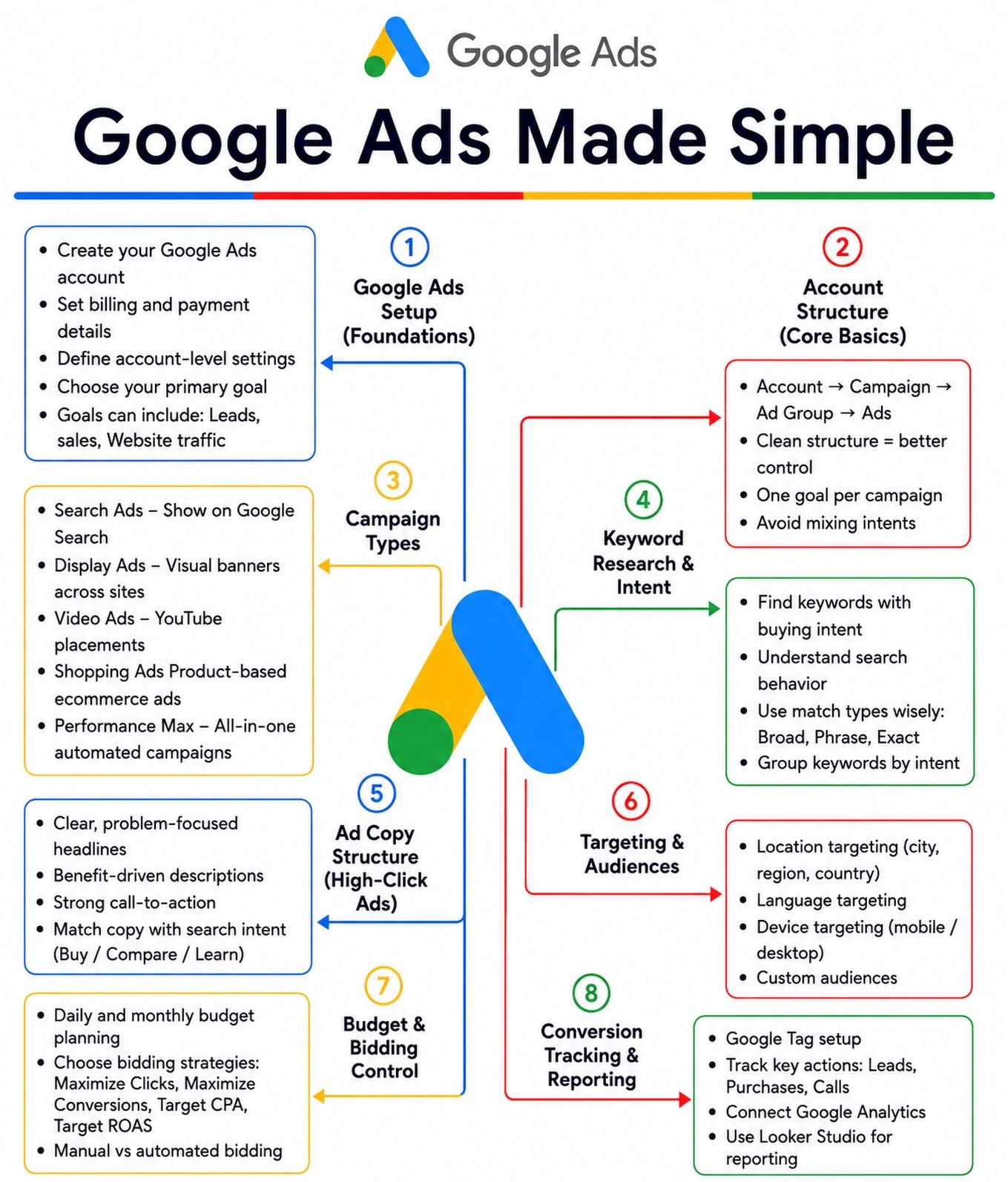
Google Ads Setup
Effective Google Ads campaigns are crucial for driving leads, sales, and business growth. The key to success lies in a well-structured approach, from account setup to conversion tracking. Here is a comprehensive guide to setting up your Google Ads campaigns, ensuring you get the most out of your advertising budget.
Why This Matters
Online advertising is a competitive landscape. A poorly structured Google Ads campaign can lead to wasted ad spend and suboptimal results. By following a step-by-step approach, you can create campaigns that not only drive results but also provide valuable insights into your audience and market trends. This guide will walk you through the essential steps to set up your Google Ads account correctly, choose the right campaign types, and optimize your budget and bidding strategies.
Main Discussion
Account Setup
The foundation of any successful Google Ads campaign is a well-setup account. Here are the crucial steps to get you started:
-
Create Your Google Ads Account: Begin by creating a Google Ads account if you don’t already have one. This account will be the backbone of your advertising efforts, so make sure it’s set up correctly from the start.
-
Define Account-Level Settings: Account-level settings include your time zone, currency, and billing information. These settings are crucial as they affect how your ads are displayed and billed.
-
Choose Your Primary Goals: Clearly define your primary goals. Are you aiming for more website traffic, lead generation, or sales? Your goals will guide the rest of your campaign setup.
Building a Clean Campaign Structure
A clean and organized campaign structure is essential for managing and optimizing your ads effectively. Here’s how to build it:
-
Ad Groups and Ads: Organize your ads into relevant ad groups. Each ad group should focus on a specific theme or keyword set. This structure makes it easier to manage and optimize your ads.
-
Campaign Types: Choose the right campaign type based on your goals. Common campaign types include Search Ads, Display Ads, and Video Ads. Each type serves a different purpose, so select the one that aligns with your objectives.
Keyword Research and Intent
Keywords are the backbone of your Google Ads campaigns. Here’s how to research and use them effectively:
-
Research High-Intent Keywords: Identify keywords that have a high buying intent. These are the keywords that potential customers are likely to use when they are ready to make a purchase.
-
Avoid Mixing Intents: Keep your keywords focused on a single intent. For example, do not mix keywords for informational searches with those for commercial searches. This helps in targeting the right audience.
Writing Compelling Ad Copy
Your ad copy is the first point of contact with potential customers. Make it count:
-
Target the Right Audience: Tailor your ad copy to resonate with your target audience. Use language and messaging that speaks directly to their needs and pain points.
-
Ad Copy Best Practices: Keep it concise, include a clear call-to-action, and make sure it aligns with the keywords you are targeting. High-quality ad copy can significantly improve your click-through rate (CTR).
Budget and Bidding
Optimizing your budget and bidding strategy is crucial for maximizing your ad spend:
-
Optimize Your Budget: Allocate your budget wisely across different campaigns and ad groups. Monitor performance and adjust your budget accordingly.
-
Bidding Strategies: Choose the right bidding strategy based on your goals. Options include manual bidding, automated bidding, and enhanced cost-per-click (eCPC). Each strategy has its advantages and is suited to different campaign objectives.
Conversion Tracking
Tracking conversions is essential for understanding the effectiveness of your campaigns:
-
Set Up Conversion Tracking: Implement conversion tracking to monitor actions that matter to your business, such as form submissions, purchases, or sign-ups.
-
Use Looker Studio for Reporting: Utilize Looker Studio to create detailed reports that provide insights into your campaign performance. Looker Studio can help you visualize your data and make data-driven decisions.
Practical Tips
Tips for Effective Keyword Research
- Use Free Tools: Utilize Google’s Keyword Planner and other free tools to find relevant keywords.
- Analyze Competitor Keywords: Look at what keywords your competitors are using and see if there are gaps you can fill.
Tips for Writing Effective Ad Copy
- Test Different Versions: Run A/B tests to see which ad copy performs best.
- Incorporate Numbers and Statistics: Use numbers and statistics to make your ad copy more compelling.
Tips for Budget Optimization
- Start Small: Begin with a smaller budget and scale up as you see positive results.
- Regularly Review Performance: Continuously monitor your ad spend and performance to make necessary adjustments.
Tips for Conversion Tracking
- Ensure Accuracy: Make sure your conversion tracking is set up correctly to avoid inaccurate data.
- Track Micro-Conversions: Sometimes, smaller actions like email sign-ups or downloads can indicate interest and lead to bigger conversions later.
Important Takeaways
A well-structured Google Ads campaign can significantly enhance your marketing efforts. By following the steps outlined—from account setup to conversion tracking—you can create campaigns that drive real results. Key takeaways include:
- Start with a Strong Foundation: Proper account setup and goal definition are crucial.
- Organize Efficiently: A clean campaign structure makes management and optimization easier.
- Target High-Intent Keywords: Focus on keywords that are likely to convert.
- Create Compelling Ads: Tailor your ad copy to resonate with your target audience.
- Optimize Your Spend: Allocate and monitor your budget effectively.
- Track and Improve: Use conversion tracking to understand and improve your campaign performance.
Conclusion
Setting up a successful Google Ads campaign involves several key steps, each crucial for driving results and optimizing your ad spend. From account setup to conversion tracking, every aspect of your campaign should be carefully planned and executed. By following this guide, you can create campaigns that not only generate more leads and sales but also provide valuable insights into your audience and market trends. Stay organized, keep testing, and always be ready to adjust your strategy based on performance data.
Watch the Reel
Questions readers ask
How do I set up a new Google Ads account?
To create a new Google Ads account, visit the Google Ads website and click on 'Start Now'. Follow the prompts to create your account, providing your business details and billing information. Once your account is set up, you'll be guided through the process of creating your first campaign.
What are the different types of Google Ads campaigns?
Google Ads offers several campaign types, including Search, Display, Video, Shopping, and App campaigns. Each type serves a different purpose, so your choice should depend on your specific goals and where your target audience is most likely to engage with your ads.
How can I optimize my Google Ads budget?
To optimize your Google Ads budget, start by setting a daily or monthly spend limit. Use the budgeting tools within Google Ads to allocate funds across your campaigns. Regularly review your performance data to adjust your bids and turn off underperforming keywords or ads. Consider using automated bidding strategies to help maximize your budget.
How do I track conversions in Google Ads?
To track conversions, you need to set up conversion actions in your Google Ads account. This involves adding a conversion tracking tag to your website or using Google Analytics. Once set up, you can monitor which ads, keywords, and campaigns are driving the most valuable actions on your site, such as purchases or sign-ups.
What steps should I follow for effective keyword research?
Start by brainstorming initial keywords related to your products or services. Use tools like Google Keyword Planner, SEMrush, or Ahrefs to find related keywords, their search volume, and competition. Consider the intent behind the keywords to ensure they align with your campaign goals. Regularly review and update your keyword list based on performance data.
How can I improve the performance of my Google Ads campaigns?
To boost your campaign performance, focus on refining your keyword list, improving your ad copy, and optimizing your landing pages. Utilize A/B testing to experiment with different ad variations. Regularly review your performance metrics and make data-driven adjustments. Consider using negative keywords to exclude irrelevant traffic and improve your click-through rate.
What are some common mistakes to avoid in Google Ads?
Avoid common pitfalls such as using broad match keywords without proper management, neglecting to use negative keywords, and not monitoring your campaigns regularly. Ensure your ad copy is compelling and relevant to the keywords you're targeting. Additionally, avoid spreading your budget too thin by not having enough ads or landing pages for your keywords.
Recent articles
Fresh deep dives from the latest Reels we unpacked.




Comments
Be the first to comment.