Customer Reviews and Online Reputation
Google Business Profiles are a powerful tool for businesses, allowing customers to leave reviews that can significantly impact a company's online reputation. Understanding how these reviews function and how to manage them effectively is crucial for maintaining a positive image. Here, we'll delve into the implications of customer updates on Google Business Profiles, and how businesses can leverage positive reviews to counteract negative feedback.
Context / Why This Matters
In today's digital age, online reviews can make or break a business. Potential customers often turn to Google Business Profiles to gauge the quality of a service or product before making a purchase. These profiles provide a platform for customers to share their experiences, both positive and negative, which can influence the decisions of future clientele. Given their permanence, customer updates can have a lasting impact on a business's reputation.
The Power of Customer Updates
Negative Reviews as Updates
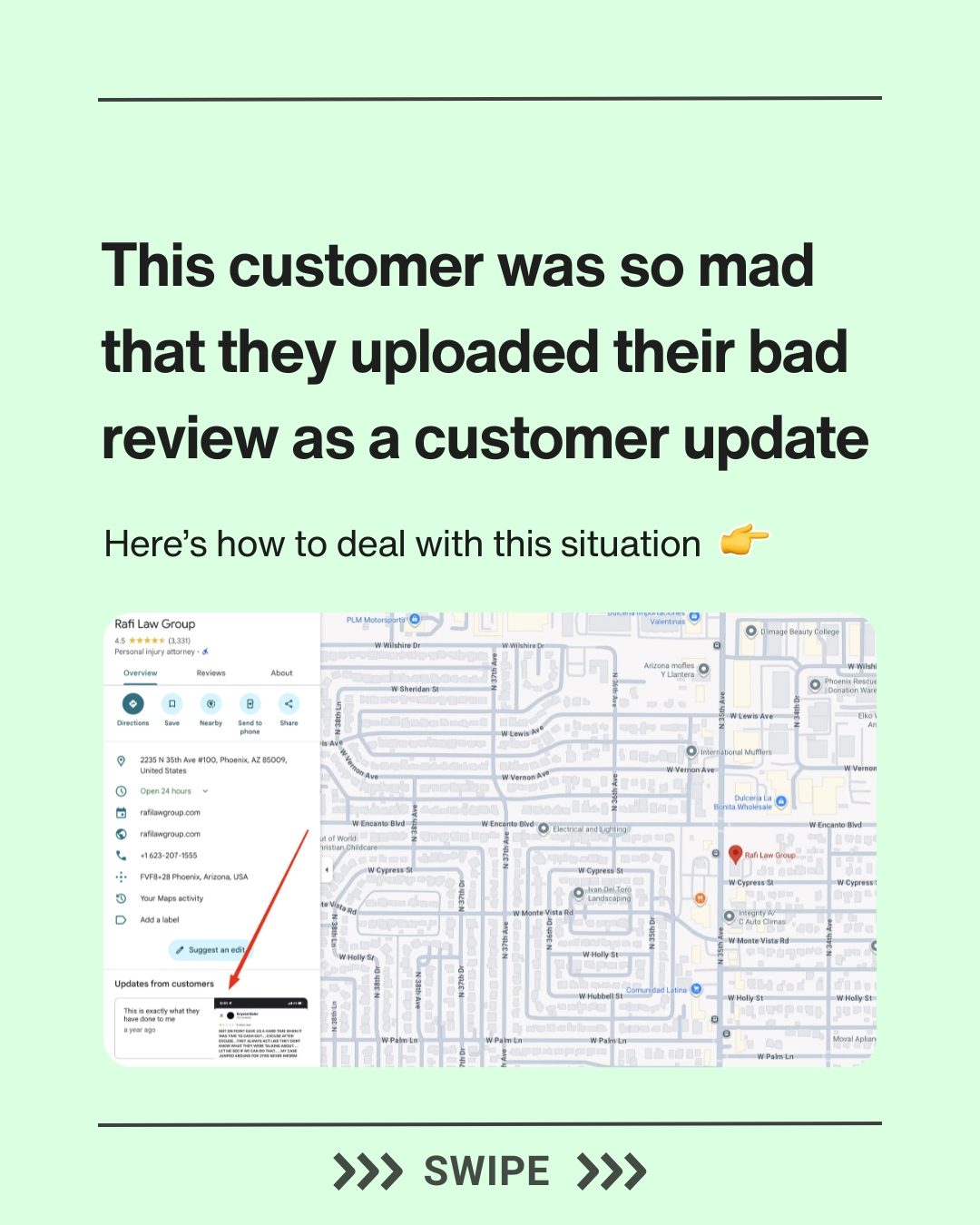
Negative reviews can be particularly damaging, especially when they are posted as updates on a business's Google Business Profile. These updates remain visible until a new update is posted, meaning they can linger and influence potential customers for extended periods. This was evident in the experience shared by Rafi Law Group, where a disgruntled customer left a negative review and posted a screenshot of it as an update on the business's profile. This update stayed visible, potentially deterring other customers.
The Permanence of Updates
One of the key points to understand is that updates from customers stay on the profile permanently until another customer publishes a new update. This permanence highlights the importance of proactive reputation management. Businesses must be vigilant in monitoring their Google Business Profiles and addressing any negative feedback promptly.
Strategies for Managing Online Reputation
Encouraging Positive Reviews
To counteract the impact of negative reviews, businesses should actively encourage their satisfied customers to post positive reviews. This not only helps to balance out the negative feedback but also provides potential customers with a more comprehensive view of the business. Positive reviews can outweigh negative ones, creating a more favorable impression.
Promoting Customer Reviews
Businesses can also be proactive in promoting customer reviews by asking satisfied customers to share their experiences. This can be done through follow-up emails, social media posts, or even in-person requests. Encouraging customers to post their glowing reviews as updates on the Google Business Profile can help to push down negative feedback and create a more positive image.
Practical Tips
Responding to Negative Reviews
When negative reviews are posted, it's essential to respond promptly and professionally. Address the customer's concerns and offer a resolution if possible. This shows other potential customers that the business takes their feedback seriously and is committed to improving their services.
Monitoring Your Profile
Regularly monitor your Google Business Profile for any new updates or reviews. Set up notifications to alert you when a new review is posted, allowing you to respond quickly and effectively. This proactive approach can help to mitigate the impact of negative feedback and maintain a positive online reputation.
Utilizing Multiple Accounts
In some cases, businesses may consider utilizing multiple Google accounts to post updates or reviews. This can be a strategic move to ensure that positive feedback remains visible. However, it's important to use this tactic ethically and transparently, as misleading practices can backfire and damage the business's reputation further.
Important Takeaways
Permanence of Updates
Updates from customers on a Google Business Profile remain visible until a new update is posted. This makes it crucial for businesses to be proactive in managing their online reputation.
Balance Positive and Negative Reviews
Encouraging satisfied customers to post positive reviews can help to balance out negative feedback and create a more favorable image. This proactive approach is essential for maintaining a positive online reputation.
Ethical Practices
While utilizing multiple accounts to post updates can be a strategic move, it's important to do so ethically and transparently. Misleading practices can backfire and damage the business's reputation further.
Conclusion
Customer updates on Google Business Profiles play a significant role in shaping a business's online reputation. Understanding the permanence of these updates and the impact of negative reviews is crucial for effective reputation management. By encouraging positive reviews, responding to negative feedback, and monitoring the profile regularly, businesses can maintain a positive image and attract more customers. The key is to be proactive, transparent, and committed to providing excellent service, ensuring that the business's online reputation reflects its true value.
Watch the Reel
Questions readers ask
How do I respond to negative Google reviews that are left on my business profile?
When responding to negative Google reviews, it's important to remain professional and empathetic. Address the customer's concerns directly, apologize if necessary, and offer a solution or next steps to resolve the issue. Avoid getting defensive or argumentative, as this can escalate the situation and potentially harm your business's reputation. Responding promptly can demonstrate to potential customers that your business is committed to customer satisfaction.
Can I remove negative Google reviews from my business profile?
Removing negative Google reviews can be challenging, as Google has strict policies in place. However, if a review violates Google’s policies—for example, it contains hate speech, is off-topic, or is clearly fake—you can flag it for removal. To do this, go to your Google Business Profile, find the review, and click on the three dots in the top right corner of the review. From there, you can select 'Flag as inappropriate' and follow the prompts.
What steps can I take to minimize the impact of negative reviews on my business?
To minimize the impact of negative reviews, focus on encouraging satisfied customers to leave positive reviews. This can help balance out the negative feedback and provide a more accurate representation of your business. Additionally, ensure that your business information is up-to-date and accurate on your Google Business Profile, as this can enhance overall customer satisfaction and reduce the likelihood of negative reviews.
How can I encourage more positive reviews from my customers?
You can encourage more positive reviews by actively asking satisfied customers to leave feedback on your Google Business Profile. This can be done through follow-up emails, in-person requests, or even through your business's social media channels. Make the process as easy as possible for customers by providing direct links to your review page. Highlighting positive reviews on your website or other marketing materials can also serve as an incentive for others to share their positive experiences.
How do I know if a negative review on Google Business Profile is legitimate?
To determine if a negative review on your Google Business Profile is legitimate, look for specific details about the customer's experience, such as dates, times, and specific interactions. Reviews that are vague, overly negative, or contain personal attacks may not be genuine. Additionally, check if the reviewer has a history of leaving reviews on other businesses, as this can indicate they are a regular reviewer. If you suspect a review is fake, you can flag it for removal through the Google Business Profile interface.
How can I monitor and manage my business's Google reviews effectively?
Effective management of your business's Google reviews involves regular monitoring. Set up alerts to notify you of new reviews so you can respond promptly. Use tools like Google Alerts or third-party review management software to stay on top of updates. Regularly check your Google Business Profile for new reviews and engage with customers by responding to both positive and negative feedback in a timely and professional manner. This proactive approach can help maintain a positive online presence and address any issues before they escalate.
What should I do if a negative review is affecting my business's online reputation?
If a negative review is significantly impacting your business's online reputation, take immediate action. Respond to the review in a professional and empathetic manner, offering a solution or next steps to address the customer's concerns. Encourage satisfied customers to leave positive reviews to balance out the negative feedback. If the review violates Google’s policies, flag it for removal. Additionally, consider reaching out to the customer directly to resolve the issue and potentially update the review.
Recent articles
Fresh deep dives from the latest Reels we unpacked.




Comments
Be the first to comment.