Google Posts: The New Repeating Feature
Google has introduced an exciting new feature for Google Posts that allows users to set posts to repeat. This update is designed to help businesses keep their Google Business Profiles looking fresh and engaging with minimal effort. Let's delve into what this new feature offers and how it can benefit your business.
Why This Matters
In the fast-paced digital world, maintaining an active and engaging online presence is crucial for businesses. Google Posts have long been a valuable tool for sharing updates, offers, and events directly on your Google Business Profile. However, managing these posts manually can be time-consuming. The new repeating feature is a game-changer, allowing businesses to automate the posting of recurring events and offers, ensuring a consistently updated profile.
Main Discussion
What is the New Repeating Feature?
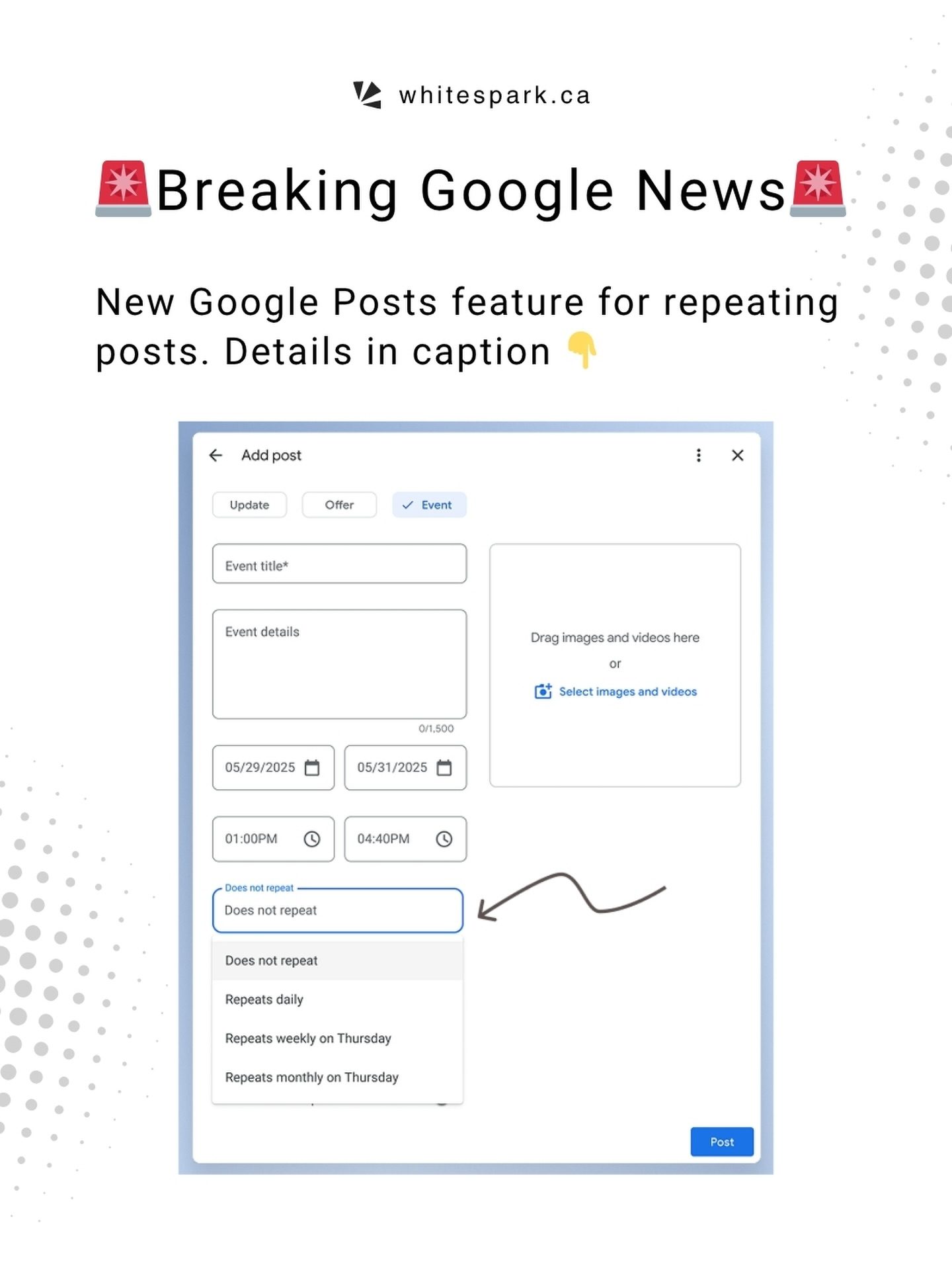
The new repeating feature in Google Posts enables users to schedule posts to repeat at specified intervals. This means you can set a post to repeat daily, weekly, or monthly, ensuring that your Google Business Profile remains active and engaging without constant manual updates.
Setting Up Repeating Posts
To set up a repeating post, you can choose from three options:
- Daily: Ideal for daily specials, daily deals, or any recurring activity that happens every day.
- Weekly: Perfect for weekly events like happy hours, quiz nights, or special promotions that occur on a specific day of the week.
- Monthly: Great for monthly events, special offers, or promotions that recur on a specific day each month.
Types of Posts That Can Be Repeated
Currently, the repeating feature is available for Offer and Event posts, but not for Update posts. This means you can automate promotions, discounts, and special events, but updates will still need to be posted manually.
Practical Use Cases
Recurring Events
Businesses with recurring events, such as happy hours, quiz nights, or live performances, can greatly benefit from this feature. For example, a restaurant can set up a weekly happy hour post to automatically repeat every Thursday, ensuring that customers are always aware of the upcoming event.
Special Promotions
For businesses that run monthly promotions, this feature is a lifesaver. A retail store can set up a monthly sale post to repeat on the first day of every month, ensuring that customers are always informed about the upcoming sale.
Benefits for Businesses
Time Efficiency
One of the most significant advantages of the repeating feature is the time it saves. Businesses no longer need to manually create and post the same content repeatedly. This frees up valuable time that can be better spent on other critical tasks.
Consistent Engagement
Consistent and regular posting is essential for maintaining engagement with your audience. With the repeating feature, you can ensure that your Google Business Profile stays fresh and engaging, even when you're busy with other aspects of your business.
Enhanced Visibility
Google Posts are a great way to improve your business's visibility on search results. By keeping your profile updated with fresh content, you can attract more customers and increase your online presence.
Practical Tips
Maximizing the Repeating Feature
To make the most of the repeating feature, consider the following tips:
-
Plan Ahead: Identify recurring events, promotions, and offers that can benefit from the repeating feature. Plan your posts in advance to ensure a consistent flow of content.
-
Use High-Quality Visuals: Ensure that your posts include high-quality images and engaging captions. Eye-catching visuals can significantly improve the visibility and engagement of your posts.
-
Monitor Performance: Keep an eye on the performance of your repeating posts. Analyze which posts are generating the most engagement and adjust your strategy accordingly.
Important Takeaways
- The new repeating feature in Google Posts allows users to set posts to repeat daily, weekly, or monthly.
- This feature is available for Offer and Event posts but not for Update posts.
- The repeating feature is ideal for recurring events, special promotions, and any content that needs to be updated regularly.
- Businesses can save time, maintain consistent engagement, and enhance visibility with this feature.
Conclusion
The new repeating feature in Google Posts is a valuable addition for businesses looking to streamline their online presence. By automating recurring posts, businesses can ensure that their Google Business Profile remains fresh, engaging, and up-to-date with minimal effort. This feature is particularly beneficial for businesses with recurring events, special promotions, and any content that needs to be updated regularly. Embrace this new feature to enhance your online visibility and keep your audience engaged.
Watch the Reel
Questions readers ask
How does the new repeating feature for Google Posts work?
The new repeating feature on Google Posts allows users to schedule their posts to automatically republish at regular intervals. You can set your posts to repeat daily, weekly, or monthly, making it easier to keep your Google Business Profile updated with minimal manual effort.
What types of posts can I schedule to repeat on my Google Business Profile?
You can schedule a variety of post types to repeat, including event announcements, promotional offers, and regular updates. This feature is particularly useful for regularly occurring events or consistent promotions that you want to keep at the forefront of your profile.
Is there a limit to how many times a post can be repeated?
As of now, Google Posts allows you to set your posts to repeat indefinitely until you manually stop the repetition. This means you can keep your audience informed about ongoing events, promotions, or important information without the need for constant updates.
Can I use the repeating feature for breaking news or time-sensitive information?
While the repeating feature is excellent for recurring events and promotions, it may not be the best fit for breaking news or time-sensitive information. For such updates, it's better to create and publish individual posts to ensure the most relevant and up-to-date information is shared with your audience.
How do I set up recurring posts on my Google Business Profile?
To set up recurring posts, simply create a new post in your Google Posts section, and when scheduling, select the 'Repeat' option. Choose the frequency (daily, weekly, or monthly) and set the end date if you don't want the post to repeat indefinitely. Once set, the post will automatically republish according to the schedule you've chosen.
Can I edit or delete a recurring post after it has been scheduled?
Yes, you can edit or delete recurring posts even after they have been scheduled. To make changes, go to the 'Posts' section of your Google Business Profile, find the scheduled post, and select the 'Edit' or 'Delete' option. Note that any edits or deletions will apply to all future instances of the post.
Will the new repeating feature for Google Posts impact my SEO efforts?
The repeating feature for Google Posts can enhance your SEO efforts by ensuring that your Google Business Profile remains active and engaging. Regular, fresh content can improve your local search rankings and keep your audience informed and engaged, ultimately driving more traffic to your business.
Related deep dives
Similar reads based on topic and creator.




Recent articles
Fresh deep dives from the latest Reels we unpacked.




Comments
Be the first to comment.