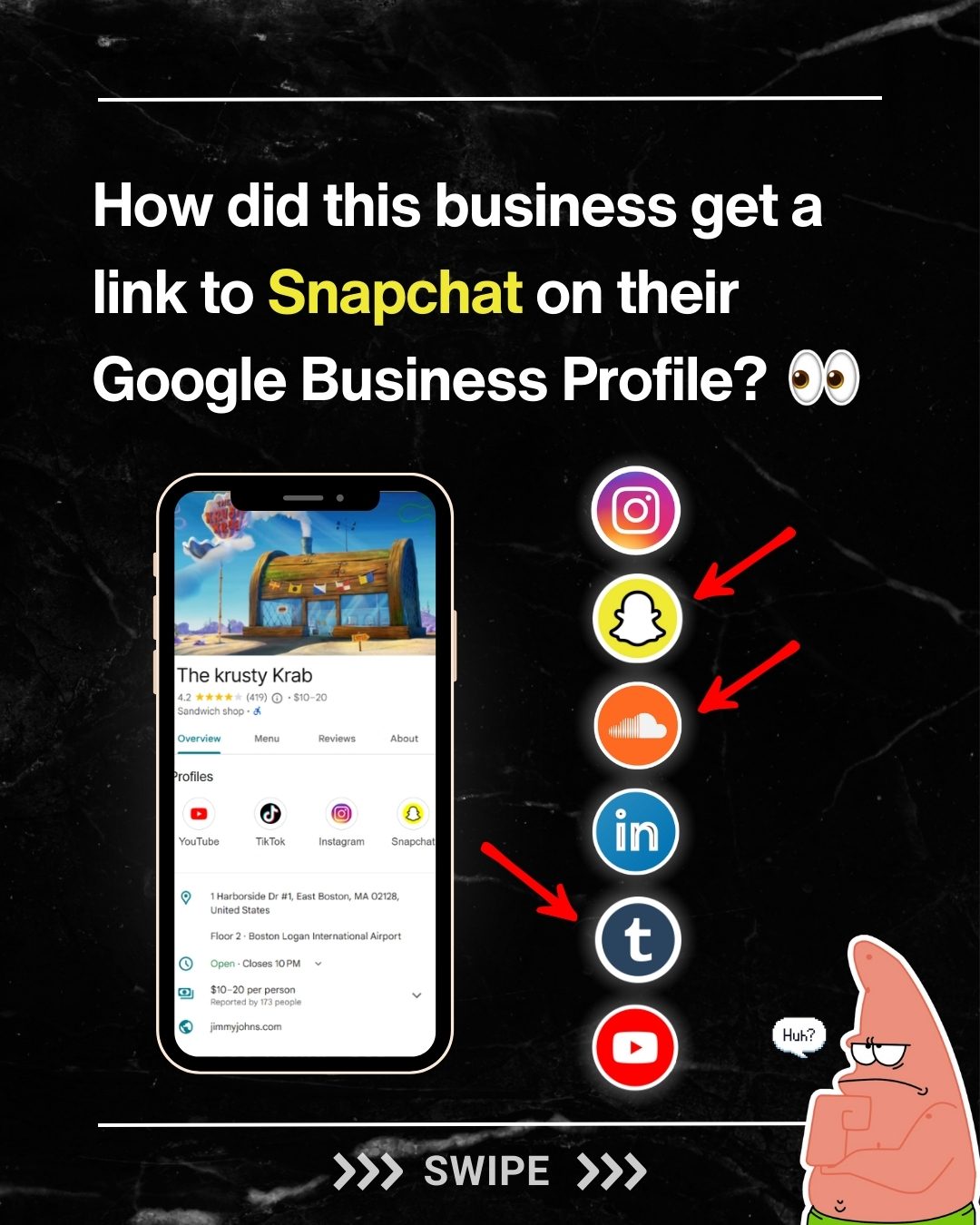
Google Business Profile Social Links
Google Business Profile is a powerful tool for businesses to manage their online presence. One of the lesser-known features is the ability to link to various social media platforms. However, it’s not as straightforward as it might seem. Currently, Google strictly limits the social media platforms you can link to, and it's essential to understand exactly why this matters and how it works.
Despite these limitations, it’s possible for unexpected social media links to appear on a Google Business Profile. This can lead to confusion and questions about how it happens, especially since these rogue links can sometimes show up without any explicit linking.
Why This Matters
Navigating the complexities of Google Business Profiles can be tricky. The ability to link to social media profiles is a significant feature, allowing businesses to enhance their online presence and build customer trust. However, understanding the limitations and how Google's algorithms work can help businesses make the most of this feature.
For businesses looking to optimize their Google Business Profiles, it's crucial to know the specific social sites that are allowed and how Google's algorithms can sometimes pick up unexpected links. This ensures that businesses can manage their online presence effectively and avoid any potential issues with rogue social links.
Main Discussion
Limitations on Social Media Links
Google Business Profiles allow businesses to add specific social media links to their profiles. The accepted social sites include:
- TikTok
- YouTube
These seven platforms are the only ones officially supported by Google for direct linking. This limitation is likely due to Google's efforts to maintain control over the quality and relevance of the information displayed on business profiles.
How Rogue Social Links Appear
One of the most intriguing aspects of Google Business Profiles is the way they can sometimes display links to social media platforms that are not officially supported. For instance, Snapchat is not one of the seven approved sites, but it can still appear on a business profile. This is due to Google's continuous web crawling and automatic association of social profiles.
Google’s algorithms are sophisticated and can sometimes detect and display links to social media platforms that are not explicitly added by the business. This can include platforms like Snapchat, SoundCloud, Tumblr, and even more specialized sites like Healthgrades. The exact mechanisms behind this are not fully disclosed, but it's clear that Google’s algorithms are capable of picking up these links automatically.
The Case of The Krusty Krab
The Krusty Krab is a fictional example of a business that displayed a link to Snapchat on their Google Business Profile, despite not having explicitly added it. This particular case highlights the peculiarities of Google’s web crawling and social media association. The business didn't even link to their Snapchat on their website or in their sameAs schema code, yet Google was still able to pick it up.
This case underscores the power of Google’s algorithms and the potential for unexpected social media links to appear on business profiles. While this might seem concerning, it can also be an opportunity for businesses to ensure their online presence is comprehensive and up-to-date.
Automatic Detection and Association
The process involves Google’s web crawlers scanning the internet for social media links associated with a business. This automatic detection can sometimes lead to the inclusion of social media profiles that were not explicitly added by the business. While this can be a useful feature, it also means that businesses need to be proactive in managing their online presence.
Impact on Online Presence
For businesses, understanding how Google’s algorithms work is crucial. The ability to automatically detect and display social media links can enhance a business’s online presence by making it easier for customers to find and engage with them on various social media platforms. However, it also requires businesses to be vigilant in ensuring that all displayed links are accurate and relevant.
Practical Tips
When managing your Google Business Profile, consider the following tips to ensure your social media links are accurate and effective:
-
Regularly Review Your Profile: Regularly check your Google Business Profile to ensure all displayed links are accurate and relevant. This can help you catch any rogue links early and take appropriate action.
-
Explicitly Add All Relevant Links: While Google’s algorithms can sometimes pick up social media links automatically, it’s important to explicitly add all relevant links to your profile. The approved sites to add include Instagram, LinkedIn, Pinterest, TikTok, Twitter, YouTube, and Facebook. This ensures that your profile is accurate and comprehensive.
-
Consistent NAP Information: Make sure your Name, Address, and Phone number (NAP) are consistent across all platforms. This consistency not only helps with local SEO but also ensures that Google’s algorithms can accurately associate your social media profiles with your business.
-
Monitor for Rogue Links: Although Google’s algorithms can sometimes display links to social media platforms that are not explicitly added, it’s important to monitor for any rogue links and take action if necessary. This might involve contacting Google support or adjusting your website’s schema code to ensure all displayed links are accurate.
Important Takeaways
Understanding the limitations and complexities of Google Business Profile social media linking is crucial for businesses looking to optimize their online presence. Key takeaways include:
- Google limits the social media platforms that can be officially linked to a business’s profile.
- Rogue social links can sometimes show up due to Google’s automatic detection and association.
- Regularly reviewing and updating your Google Business Profile is essential to ensure all displayed links are accurate and relevant.
- Managing your online presence effectively ensures that all potential customers can easily find and engage with your business on various social media platforms.
Conclusion
In summary, while the limitations on social media linking for Google Business Profiles might seem restrictive, they are essential for maintaining the quality and relevance of the information displayed. Understanding how Google’s algorithms work and being proactive in managing your online presence can help businesses make the most of this feature and avoid any potential issues with rogue social links. By regularly reviewing your profile, explicitly adding all relevant links, and monitoring for any unexpected links, you can ensure your Google Business Profile is accurate, comprehensive, and effective.
Watch the Reel
Questions readers ask
How can I add social media links to my Google Business Profile?
To add social media links to your Google Business Profile, you need to use the 'Info' section of the Google Business Profile manager. You can add links to popular platforms like Instagram, Facebook, and Twitter in the 'Website' section, but Google does not currently support direct linking to Snapchat.
Why does my Google Business Profile have an unexpected Snapchat link when I didn’t add it?
Unexpected links, such as a Snapchat link, may appear on your Google Business Profile due to inconsistencies in your online presence. Google may pull content from various sources, including social media platforms, or incorrect information provided in third-party directories or websites. This can lead to rogue links appearing on your profile.
What should I do if I see an unexpected social media link on my Google Business Profile?
To remove an unexpected social media link, go to the 'Info' section of your Google Business Profile and either remove the incorrect link or edit it to the correct one. You can also reach out to Google Business Profile support for assistance in removing links that you did not add.
How can I improve the accuracy of my Google Business Profile?
To improve the accuracy of your Google Business Profile, regularly monitor and update your business information, including contact details, website, and social media profiles. Ensure that all listings and directories have consistent information about your business.
Can I add a Snapchat link to my Google Business Profile using schema markup?
As of now, Google Business Profile does not support the addition of Snapchat links directly through the platform. Adding schema markup to your website can enhance your site's search visibility, but it won't specifically add a Snapchat link to your Google Business Profile.
How does Google Business Profile handle social media links from other directories?
Google Business Profile may pull social media links from other directories, websites, and platforms where your business is listed. If you find incorrect or unexpected links, it is essential to update your business information across all platforms to ensure consistency and accuracy.
Why doesn't Google Business Profile support Snapchat links?
Google Business Profile currently supports direct linking to a limited number of social media platforms, primarily Instagram, Facebook, and Twitter. Snapchat is not currently one of the supported platforms, and there is no official indication that this will change in the near future.
Recent articles
Fresh deep dives from the latest Reels we unpacked.




Comments
Be the first to comment.