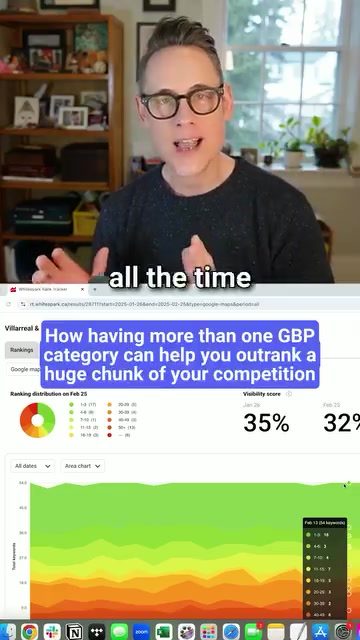
Optimizing Google Business Profiles for Better Local Search Rankings
There's a common oversight in local search results: many businesses only have one category listed on their Google Business Profiles (GBPs). This oversight represents a significant missed opportunity for both search visibility and lead generation. Here's why it matters and what you can do about it.
The Power of Multiple Categories
Categories in a Google Business Profile serve a crucial role in search rankings. Each category functions as a keyword, helping your business appear in relevant searches. The more categories you have, the broader your reach and the higher your chances of appearing in search results. This is because categories influence not only search visibility but also the range of services you can list.
Services and Categories: A Direct Impact on Rankings
Services listed on your GBP are directly tied to your categories. The more categories you have, the more services you can add. This is significant because services have a direct impact on your search rankings. By expanding your categories, you increase the number of services you can offer, thereby improving your chances of ranking higher in local searches.
How to Identify and Add Relevant Categories
Knowing which additional categories to add can be a challenge. However, tools like Whitespark’s Local Rank Tracker can provide valuable insights. This tool allows you to see what categories your competitors are using and how they are ranking. By scrolling through the results and examining well-optimized profiles, you can identify new categories to add to your own profile.
Practical Steps to Enhance Your Google Business Profile
-
Auditing and Expanding Categories
Start by going through your Google Business Profile and adding any additional categories that apply to your business. Stay updated with new categories that Google introduces. Websites like Pleper offer regularly updated lists of Google Business Profile categories, making it easier to stay informed.
-
Optimizing Predefined and Custom Services
Google provides a list of predefined services for various businesses. Review this list and add the services you offer. For each service, write a detailed description to provide more context and improve your search visibility. Custom services can also be added for unique offerings that aren't listed in Google's predefined menu. Create a custom service and provide a detailed description to ensure it is fully optimized.
-
Utilizing Tools for Efficient Management
Use Whitespark’s Local Platform software to monitor and manage the services Google adds to your profile. This tool allows you to accept or reject suggested services, ensuring your profile remains accurate and optimized. The software is affordable, costing only $1 per month, making it a cost-effective solution for managing your GBP.
How Categories Impact Rankings
By adding more categories to your Google Business Profile, you are effectively adding more keywords to your profile. This increases the chances of your business appearing in a wider range of search queries. Additionally, the categories you choose can influence the types of searches your business will appear in, ensuring that you are targeting the right audience.
Practical Tips
Stay Updated with Category Changes: Google frequently updates its list of categories. Stay informed about these changes to ensure your profile remains relevant and optimized.
Regularly Review and Update Your Profile: Regularly audit your Google Business Profile to ensure all information is up-to-date. This includes adding new categories, updating services, and ensuring all descriptions are accurate and relevant.
Use Analytical Tools: Tools like Whitespark’s Local Rank Tracker and Local Platform can provide valuable insights and help you manage your profile more effectively. These tools can save you time and ensure your profile remains optimized.
Important Takeaways
- Multiple Categories Boost Visibility: Having more than one category on your Google Business Profile can significantly improve your search rankings and visibility.
- Services Depend on Categories: The more categories you have, the more services you can list, which directly impacts your rankings.
- Tools for Optimization: Utilize tools like Whitespark’s Local Rank Tracker and Local Platform to stay informed about categories and manage your profile effectively.
Conclusion
Optimizing your Google Business Profile with multiple categories and services is a powerful strategy for improving your local search rankings and attracting more leads. By following the steps outlined above and utilizing the right tools, you can stay ahead of your competition and ensure your business is seen by the right audience.
Watch the Reel
Questions readers ask
Why is it important to add multiple categories to my Google Business Profile?
Adding multiple categories to your Google Business Profile increases your local search visibility by providing more keywords for Google to match with relevant searches. This helps your business appear in a wider range of search results, driving more leads and potential customers to your door.
How do I add categories to my Google Business Profile?
To add categories to your Google Business Profile, log in to your Google Business Profile Manager. Under the 'Info' tab, click on 'Add Category' and enter the categories that best describe your business. You can add up to 10 categories. Ensure you choose categories that accurately represent your services to improve your local search rankings.
Can adding categories to my Google Business Profile help with local SEO?
Yes, adding categories to your Google Business Profile can significantly improve your local SEO. Each category acts as a keyword, helping your business appear in relevant searches. This increases your online presence and makes it easier for potential customers to discover your business.
How many categories should I add to my Google Business Profile?
You can add up to 10 categories to your Google Business Profile. It's recommended to use as many relevant categories as possible to maximize your local search visibility. Be sure to choose categories that accurately reflect the services and products you offer to attract the right audience.
What are the benefits of using specific categories related to my services on my Google Business Profile?
Using specific categories related to your services on your Google Business Profile helps to target the right audience. It allows your business to appear in searches for those specific services, increasing the likelihood of attracting potential customers who are looking for exactly what you offer.
What if I can't find a specific category that fits my business on Google Business Profile?
If you can't find a specific category that fits your business, consider using a combination of primary and secondary categories that best represent what you offer. You can also use the 'custom category' option if available, which allows you to create a more tailored description of your business.
Recent articles
Fresh deep dives from the latest Reels we unpacked.




Comments
Be the first to comment.